Shopify Alt Text: See What's Missing Before You Spend
See exactly how many images need alt text before you spend a single credit
You've been there: staring at your Shopify catalog, wondering how many product images actually need alt text. Fifty? Five hundred? Maybe a thousand?
You know some images already have descriptions. You know some don't. But you have no idea what the breakdown is—and you're supposed to make decisions about credits without that information.
That guessing game? It's over.
The most requested feature in AltText.ai history
Starting today, your dashboard shows you exactly what's in your catalog before you spend a single credit. Total images. Images missing alt text. Images already completed. Your available credits. All visible at a glance.
No more flying blind. You can see the exact scope of work before you commit any resources.
This is the feature we heard about most from Shopify store owners: "I just want to know what I'm working with before I start."
Now you do.
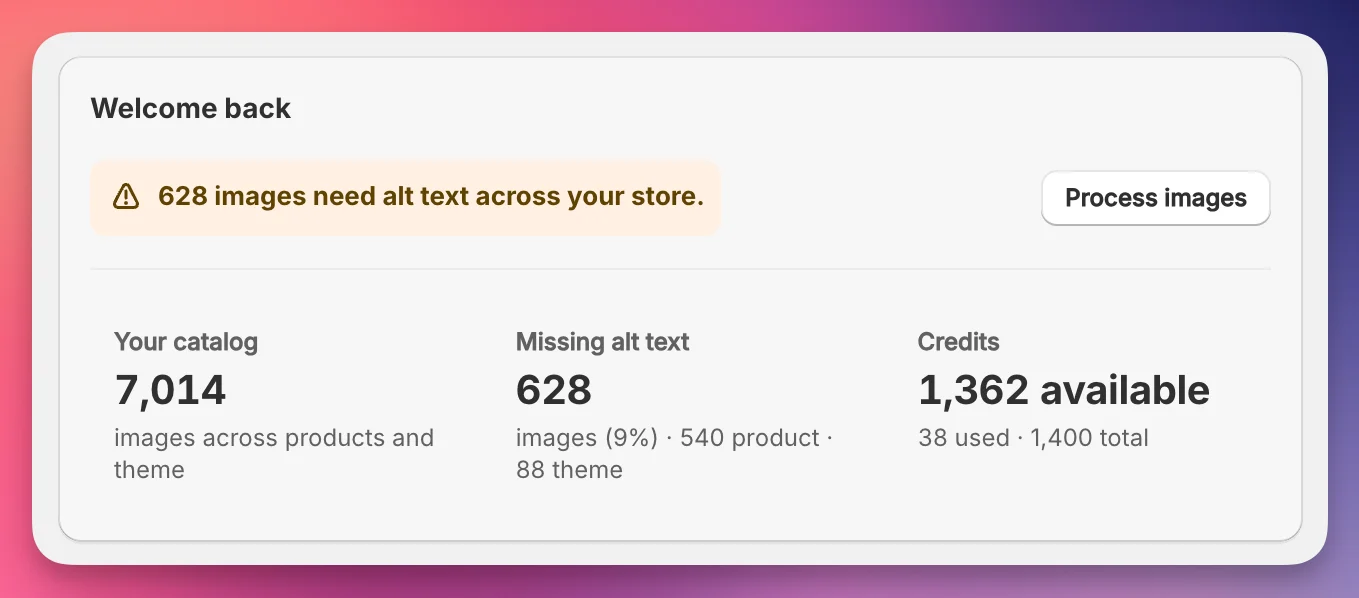
See your entire catalog breakdown at a glance—before spending a single credit
We rebuilt the whole thing
This wasn't just adding one feature—we rebuilt the entire dashboard from the ground up.
Navigation is faster. Settings are organized better. Everything got a fresh coat of polish. The tool still does what it's always done (and does it well), but now it gets out of your way even more.
Your workflow stays the same. Click a product collection, generate alt text, move on. But now the interface feels tighter, cleaner, and more responsive.
Real-time stats with smart caching
Here's what's happening under the hood: your dashboard pulls fresh catalog data from Shopify and caches it so you're not waiting on API calls every time you check your numbers.
See the "Last updated X minutes ago" timestamp? That tells you exactly when the data was pulled. Want the absolute latest numbers? Hit the refresh button. Your catalog stats update in seconds.
This means you can check your dashboard as often as you want without worrying about slow load times or stale data. The system handles the heavy lifting automatically.
What this means for you
Confidence: You know your scope before committing. If you've got 800 images and only 200 need alt text, you see that immediately. No surprises.
Efficiency: Navigation is faster. Settings are easier to find. Everything loads quickly. You spend less time clicking around and more time getting work done.
Transparency: The "Last updated" timestamp shows you when your data was pulled. The refresh button puts control in your hands. You always know what you're looking at.
Control: See your entire catalog, filter by collection, check individual products. Make informed decisions about where to focus your efforts and how to spend your credits.
Your dashboard is already upgraded
There's nothing to install or configure. Log in to your dashboard, and you'll see the new interface immediately.
All your settings carried over. Your API key still works. Your credits are still there. We just made the whole experience cleaner, faster, and more transparent.
Check it out. Your dashboard is waiting.
See your catalog before you spend a credit
Dashboard 2.0 is live for all AltText.ai users. Log in and see exactly how many images need alt text—right now, at a glance.