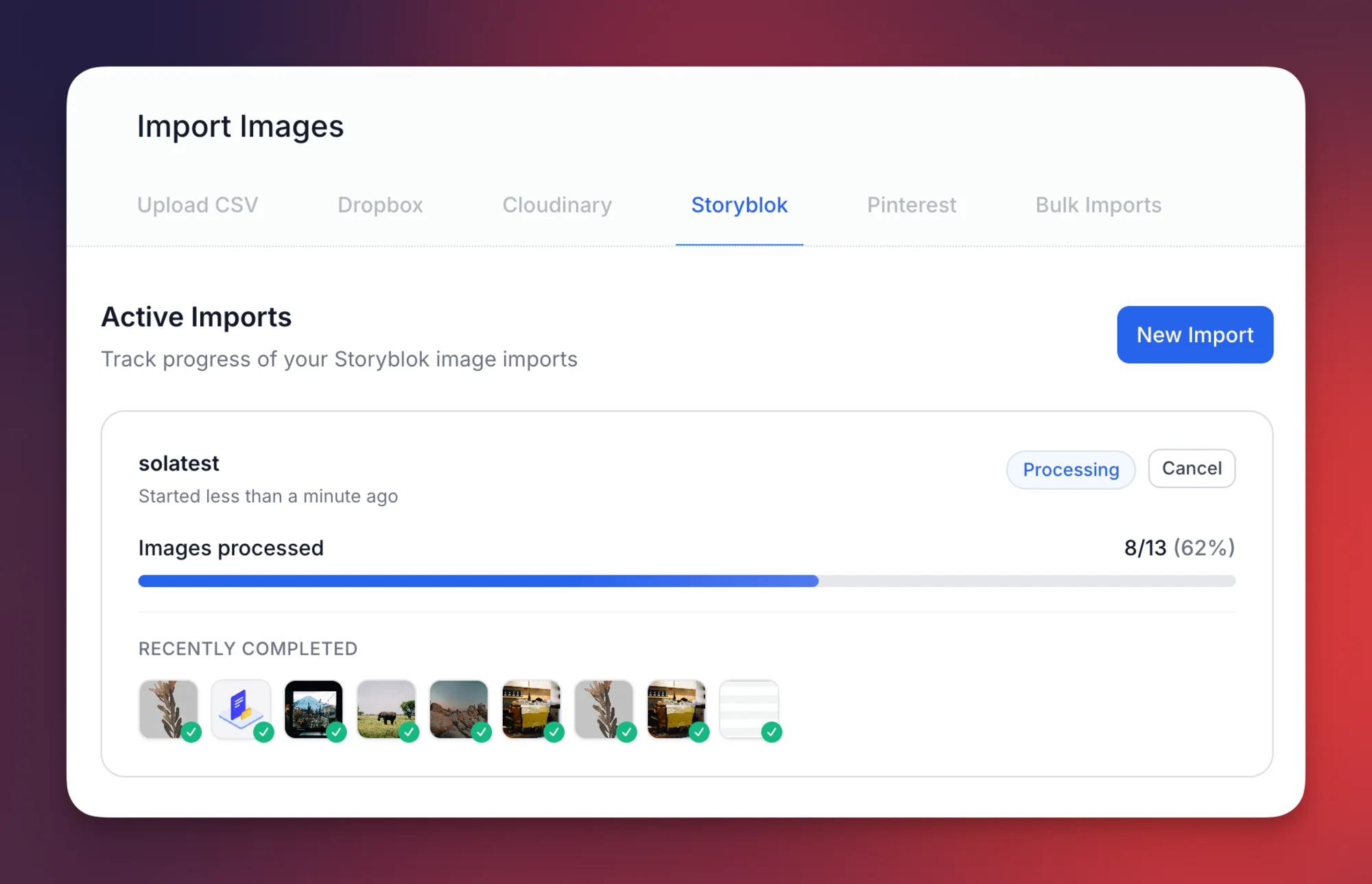
Bulk Update Your Entire Asset Library
Already have thousands of images without alt text? Configure your Storyblok settings once, then run our Bulk Updater to process your entire asset library in the background. Select a space, hit import, and come back to fully described images.
Background Processing
Everything runs in the background. Start the import and keep working—alt text is generated and written back to your Storyblok assets automatically.
Smart Filtering
Skip images that already have alt text to preserve your manual work. Only process what actually needs processing.
Progress Tracking
Real-time progress tracking for every import. See exactly how many images have been processed and review past imports.
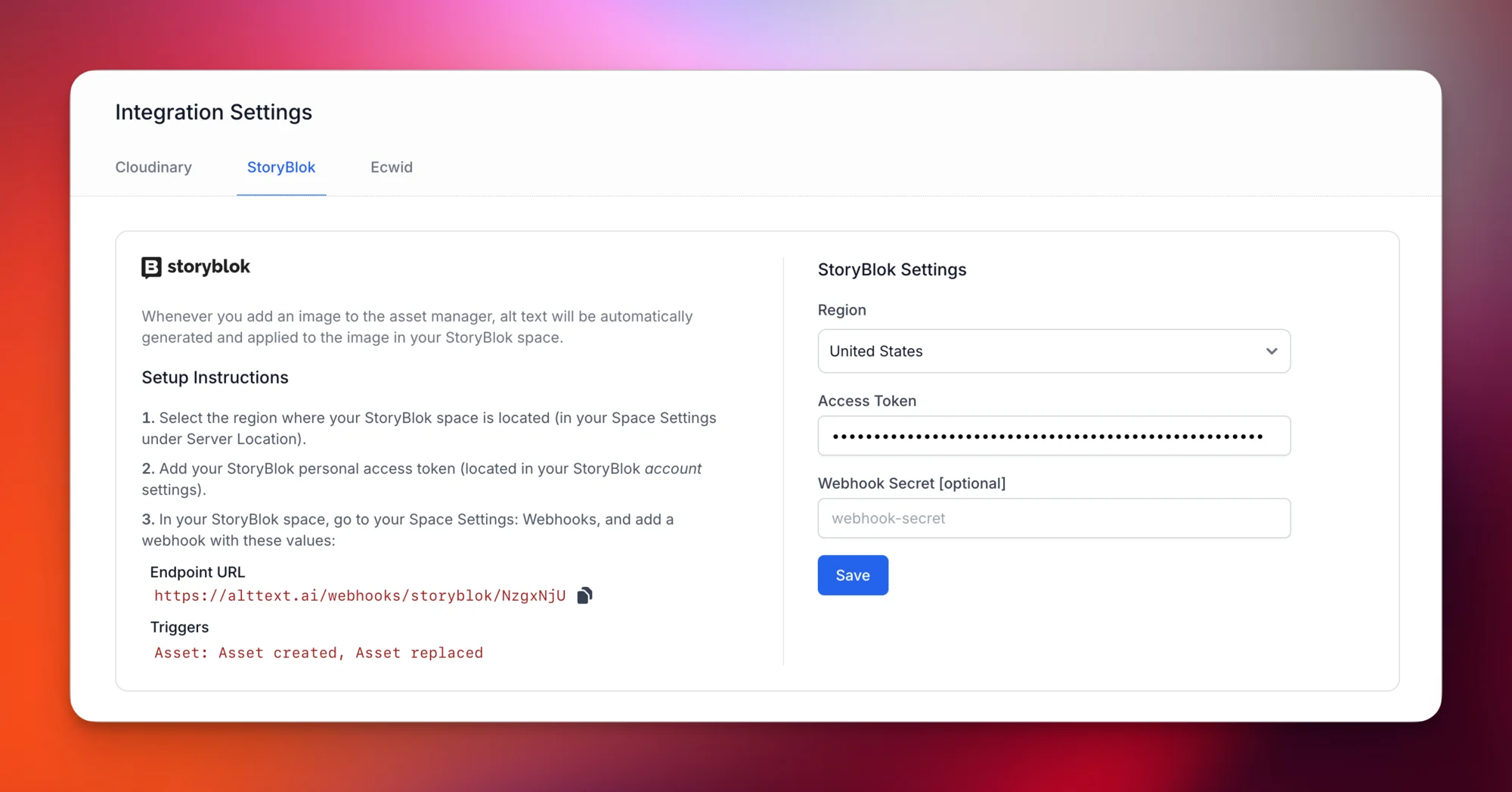
Webhook-Based Alt Text Automation
Once your settings are configured, every new image you upload automatically gets alt text too. Our AI analyzes the image, generates a descriptive caption, and writes it back to your Storyblok asset—all within seconds. No extra setup required.
Instant Processing
Upload an image to Storyblok, get alt text back in seconds. No manual intervention required.
SVG & AVIF Support
Modern image formats fully supported—set up once and forget about it.
Multi-Language Ready
Generate alt text in 130+ languages to match your multi-region Storyblok content.
How It Works
Configure once, then bulk process existing images and automate new uploads:
Configure Settings
Select your Storyblok region and enter your Personal Access Token. This connects both the Bulk Updater and webhook automation.
Bulk Update
Run the Bulk Updater to process your entire existing asset library in the background. Come back to fully described images.
Automate New Uploads
Add a webhook in Storyblok so every new image automatically gets alt text within seconds.
Customize Your Alt Text
Fine-tune how alt text is generated for your Storyblok content:
Multi-Language Support
Generate alt text in 130+ languages to match your multi-region Storyblok content. Perfect for international content strategies.
Final Pass
Write prompts like "always mention our brand name" or "keep descriptions under 125 characters" to maintain brand voice consistency.
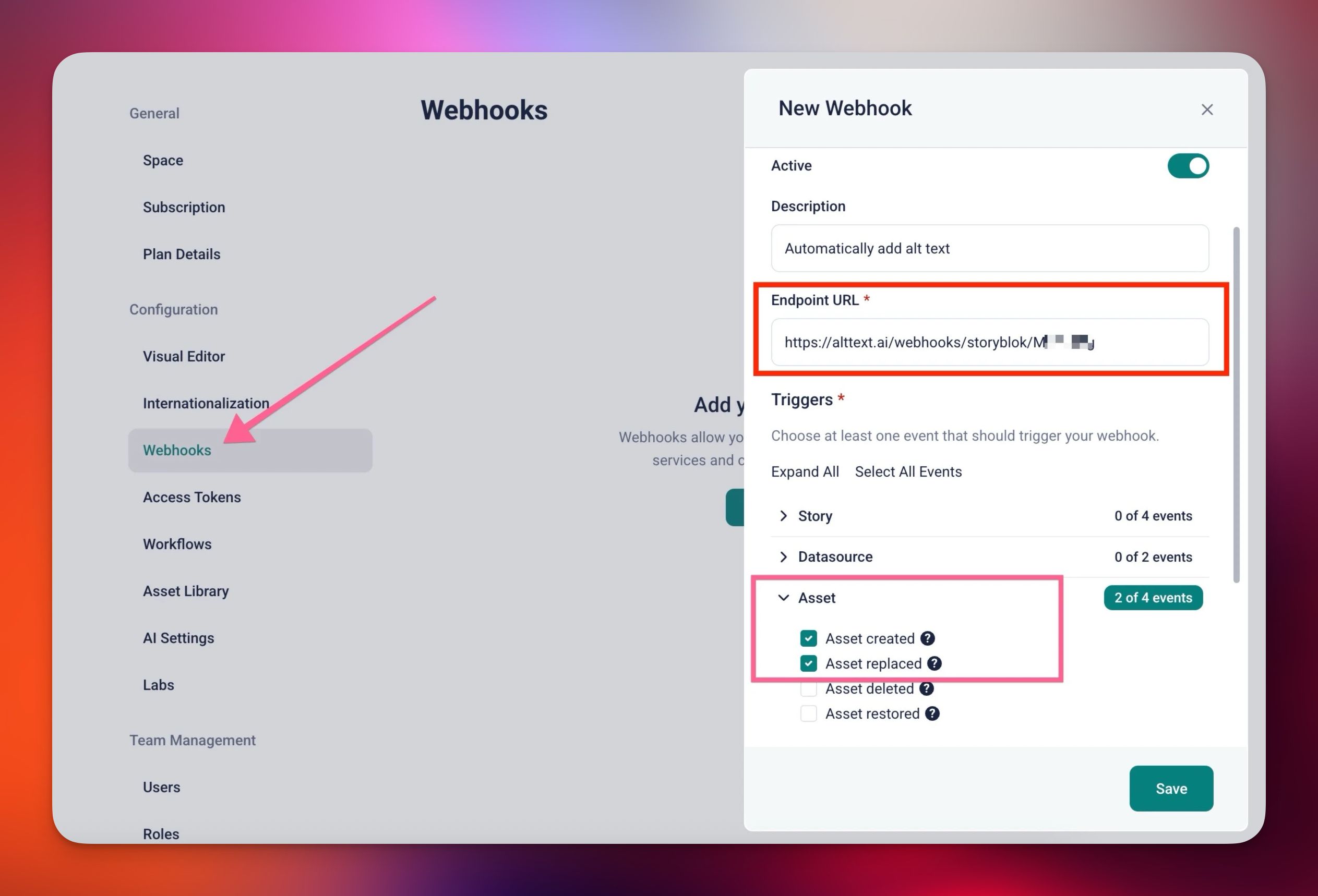
Simple Webhook Setup
Adding the webhook takes two minutes. In Storyblok Space Settings, add a new webhook pointing to your unique AltText.ai endpoint. Select the Asset created and Asset replaced triggers. That's it—every new image automatically gets alt text.
All Regions Supported
Works with all Storyblok server regions: US, EU, Canada, Australia, and China.
Secure Connection
Optional webhook secret for additional security. Your data stays protected.
Manual vs Automated Alt Text in Storyblok
Writing Alt Text by Hand
- 500 assets with 3 languages = 1,500 descriptions to write
- Quality varies by contributor—some assets get nothing
- Content velocity suffers when teams prioritize alt text
- Existing library sits with missing descriptions indefinitely
With AltText.ai
- All assets processed automatically in the background
- Consistent quality across every image, every language
- Content teams stay focused on content, not descriptions
- Bulk process existing library to close the gap immediately
Who Uses AltText.ai with Storyblok
Agencies Managing Multiple Spaces
Each client space gets its own webhook. One AltText.ai account handles all of them. Scale accessibility across your entire client portfolio.
Enterprise Marketing Teams
High-velocity content production meets accessibility requirements. Every campaign image gets described before it goes live.
E-commerce with Headless Architecture
Product images, lifestyle shots, promotional banners—all get SEO-optimized alt text automatically. Better rankings, more traffic.
Publishers and Media Companies
Article images, thumbnails, featured graphics—maintain accessibility across thousands of pieces of content without slowing down editorial.
What Storyblok Users Say
"The webhook integration is seamless. Set it up once and every asset we upload automatically gets alt text. Saves our content team hours every week."
Emily Rodriguez
Content Director
"Perfect for our multi-language content strategy. We get alt text in all our target languages automatically. The quality is consistently excellent."
Marcus Chen
Head of Digital Marketing
"We manage multiple Storyblok spaces for clients. One AltText.ai account handles all of them. Accessibility compliance made simple."
Sarah Thompson
Agency Owner
Simple, Transparent Pricing
Annual plans include rollover credits. Pick the tier that matches your image volume.
Bronze
Perfect for personal blogs and portfolios
$49/year
1,200 credits (4¢ per image)
View Bronze planSilver
Growing websites and small businesses
$189/year
6,000 credits (3¢ per image)
View Silver planGold
E-commerce stores and content teams
$489/year
24,000 credits (2¢ per image)
View Gold planPlatinum
Enterprise publishers and platforms
$2199/year
120,000 credits (<2¢ per image)
View Platinum planNeed more? Contact us for enterprise pricing.
Storyblok Alt Text FAQs
FAQ
-
Two ways: our Bulk Updater processes your entire existing asset library in the background, and webhook automation handles every new upload automatically. Configure your Storyblok region and access token once, and both features are ready to use.
-
Yes. Any image added through the Visual Editor, asset manager, or API triggers the webhook. The alt text is stored in the asset's alt field and available everywhere the asset is used.
-
Two events: 'Asset created' (new uploads) and 'Asset replaced' (updated images). You configure these triggers when adding the webhook in Storyblok Space Settings.
-
Yes. AltText.ai supports a Final Pass prompt that rewrites every generated alt text. For example, you can instruct the AI to always mention your brand name, use specific terminology, or keep descriptions under a certain character limit.
-
Absolutely. We support 130+ languages through Google Translate and DeepL. Configure your target languages once, and every image gets alt text in all specified languages. Each additional language uses one credit per image.
-
Standard formats (JPG, PNG, WebP) cost 1 credit per image. Advanced formats (SVG, AVIF) cost 2 credits. You get 25 free credits to start. Plans start at $49/year for 1,200 credits with enterprise plans offering volume discounts.
-
Configure your Storyblok settings, then go to the Bulk Updater and select a space. Enable 'skip existing' to preserve alt text you've already written. Hit import and it runs entirely in the background—you don't need to stay on the page. Each import is tracked with real-time progress.
-
Yes. Our AI generates descriptions that meet WCAG 2.1 Level AA guidelines for alternative text. This covers the technical requirement—screen readers receive meaningful context for every image.
-
Yes. We support all Storyblok server regions: United States, European Union, Canada, Australia, and China. Select your region in the AltText.ai integration settings.
-
All major formats: JPG, PNG, WebP, GIF, SVG, and AVIF. SVG and AVIF cost 2 credits due to additional processing complexity—but few other tools support them at all.
Nothing found.
If you can't find what you're looking for, please contact our customer support team.
Related CMS Solutions
Using other platforms alongside Storyblok? We integrate with these too:
WordPress Alt Text Plugin
Native WordPress plugin with Yoast, RankMath, and WooCommerce integration.
Contentful Alt Text App
One-click alt text generation directly in the Contentful content editor.
DatoCMS Alt Text Plugin
Install from the DatoCMS Marketplace for instant alt text generation.
Cloudinary Alt Text Integration
Webhook automation for your Cloudinary media library.
View all CMS integrations | Bulk processing options | API documentation
Alt Text for Your Entire Storyblok Library
Connect your Storyblok space in five minutes. Bulk update existing images and automate new uploads—every image gets AI-generated, WCAG-compliant alt text. Start with 25 free images.
Free trial, no credit card required.