Setup time
Time saved
Languages
2.1 AA Compliant
Native Cloudinary Integration
Connect your Cloudinary account in integration settings, configure a webhook, and every image upload gets alt text automatically. We write descriptions directly to your Cloudinary metadata fields—no extra API calls, no delivery pipeline changes.
Webhook-Powered Automation
Cloudinary notifies us when you upload images. We analyze them using GPT-4 Vision and write the alt text back to your metadata within seconds.
Writes to Your Metadata Fields
Alt text goes directly into your Cloudinary Context metadata (the 'alt' key) or any custom structured metadata field you specify.
How Cloudinary Alt Text Automation Works
Connect your account, configure the webhook, and alt text flows automatically:
Secure Handshake
Enter your Cloud Name, API Key, and API Secret in your AltText.ai integration settings. This gives our AI permission to read uploads and write metadata.
Configure the Listener
In Cloudinary Settings > Webhook Notifications, add our webhook URL with "upload" notification type. Now Cloudinary tells us every time a new image arrives.
Automated Enrichment
Upload images as usual. We analyze them, generate natural language descriptions, and write the alt text to your metadata—usually within seconds.
Retroactive Intelligence
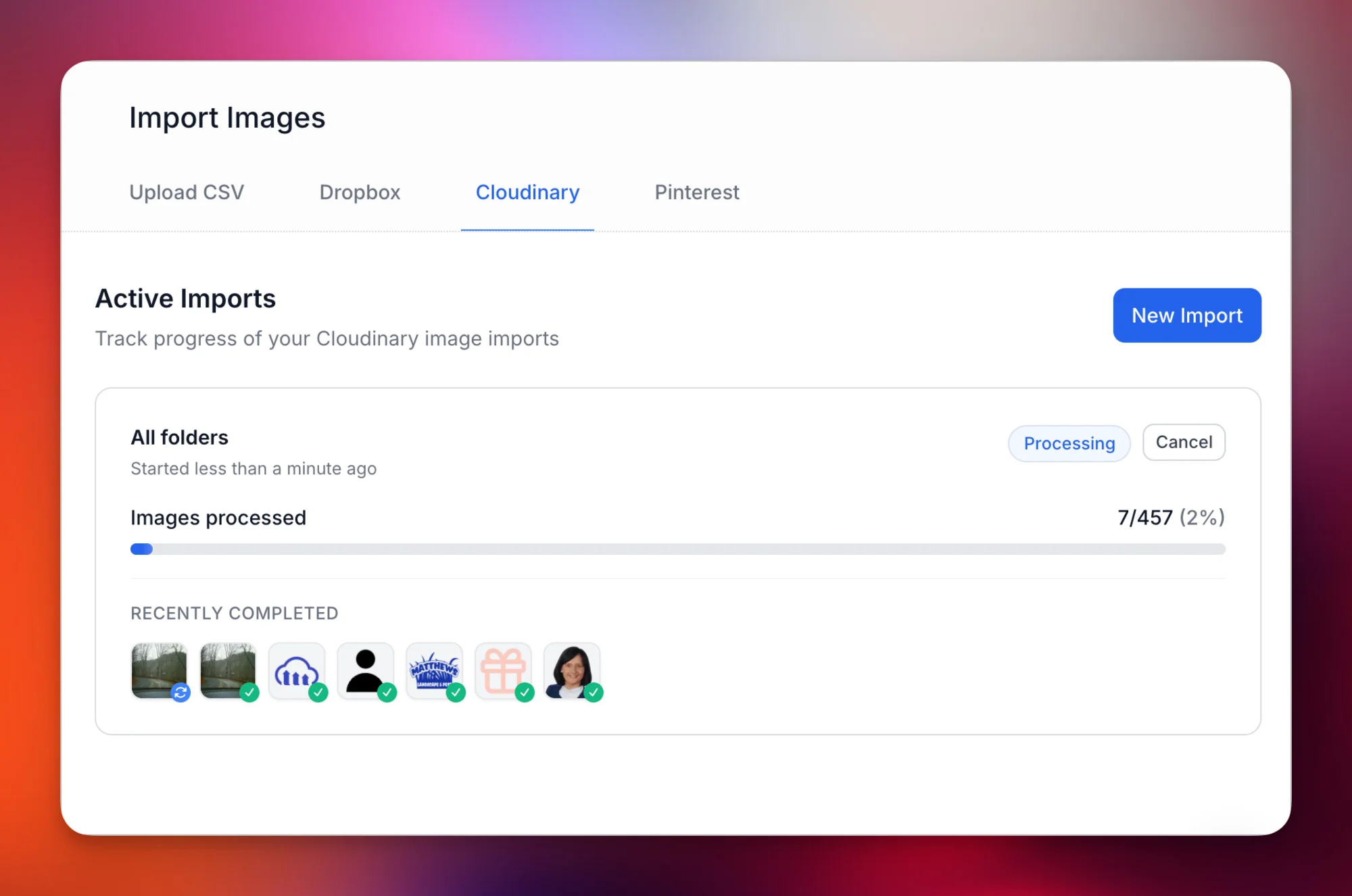
Most tools only handle new uploads. Our Cloudinary Import Tool processes your entire existing library. Import multiple folders at once, enable smart filtering to skip images that already have alt text, and we process thousands of historical assets in the background.
Multi-Folder Processing
Import from multiple Cloudinary folders in a single operation—one folder per line. Include subfolders with a single checkbox. Each folder is tracked independently.
Smart Filtering
Skip images that already have alt text to preserve your manual work. Only process what needs processing.
Why Cloudinary Users Choose AltText.ai
Built specifically for DAM workflows at enterprise scale:
DAM-Specific Context
We understand Cloudinary is used for e-commerce and publishing. Our AI generates descriptions that work for product images, editorial content, and marketing assets.
Enterprise-Grade Scale
Processing thousands of images per hour? Launching a seasonal catalog? Migrating a massive library? Our infrastructure handles spikes without breaking stride.
Developer-First Customization
Configure which metadata field receives alt text. Use Final Pass to match your brand voice. Whitelist specific folders for processing.
Certified Security
As a Certified Technology Partner, our integration uses authenticated API calls. Your credentials are encrypted, your assets remain protected.
Unlock Dark Data
Your images contain information locked in pixels. We convert visual data to text, making your DAM searchable with natural language queries like "blue running shoes outdoors."
SEO and Accessibility
Alt text improves Google Image rankings and ensures WCAG 2.1 compliance. Every image becomes a potential organic traffic source and an accessible experience.
AltText.ai vs. Cloudinary Built-in AI
Cloudinary AI Vision / Auto Tagging
- Generates keyword tags like "beach, sunset, person"
- Tags stored separately, not as alt text
- Requires manual conversion to natural language
- Not WCAG-compliant for accessibility
AltText.ai Integration
- Generates natural language: "A woman in a red sundress walking along a sandy beach at sunset"
- Writes directly to your metadata fields
- Ready-to-use descriptions, no conversion needed
- WCAG 2.1 Level AA compliant output
Common Cloudinary + AltText.ai Workflows
E-commerce Product Catalogs
Upload product images to Cloudinary, alt text generates automatically and syncs to your DAM. Downstream systems pulling from Cloudinary get SEO-optimized descriptions without additional API calls.
Used by: Online retailers, marketplace platforms, product manufacturers
Media Publishing Workflows
Editorial teams upload images through your CMS. Cloudinary webhook triggers alt text generation. Articles go live with complete accessibility metadata, no manual intervention required.
Used by: News organizations, digital publishers, content platforms
Marketing Asset Libraries
Agencies maintain asset libraries in Cloudinary. Use bulk import to process historical campaigns, then webhook automation handles new uploads. Every client deliverable includes accessible images.
Used by: Marketing agencies, brand teams, creative studios
Legacy Library Migration
Import thousands of historical images from other DAMs into Cloudinary. Use folder-based processing to generate alt text for the entire archive. Transform dark data into searchable, accessible assets.
Used by: Enterprises, universities, government agencies
What Cloudinary Users Say
"We had 50,000 product images in Cloudinary with no alt text. The bulk import tool processed everything in a weekend. Search traffic from Google Images tripled in 90 days."
David Kim
E-commerce Director
"The Certified Partner integration gives me confidence the connection is secure and maintained. Set it up once, it just works. Our editorial team never thinks about alt text anymore."
Jennifer Walsh
Digital Operations Manager
"We manage DAM libraries for dozens of clients. One AltText.ai account handles all their Cloudinary instances. Accessibility compliance made simple at scale."
Alex Patterson
Agency Technical Director
Simple, Transparent Pricing
Annual plans include rollover credits. Pick the tier that matches your image volume.
Bronze
Perfect for personal blogs and portfolios
$49/year
1,200 credits (4¢ per image)
View Bronze planSilver
Growing websites and small businesses
$189/year
6,000 credits (3¢ per image)
View Silver planGold
E-commerce stores and content teams
$489/year
24,000 credits (2¢ per image)
View Gold planPlatinum
Enterprise publishers and platforms
$2199/year
120,000 credits (<2¢ per image)
View Platinum planNeed more? Contact us for enterprise pricing.
Cloudinary Alt Text FAQs
FAQ
-
It's a specialized integration that connects our AI engine directly to your Cloudinary Media Library. When you upload images, we automatically generate descriptive alternative text and save it to your Cloudinary metadata fields—making your assets accessible and SEO-optimized without manual work.
-
Yes! Our Cloudinary Import Tool lets you process your entire existing library. Import multiple folders at once by entering one folder per line, enable subfolder processing, and optionally skip images that already have alt text. Each folder is queued and tracked independently, so you can monitor progress across your entire library.
-
By default, we store generated alt text in the 'Context' metadata field (specifically the 'alt' key). You can also configure the integration to write to a custom structured metadata field if your workflow requires it.
-
We support all major web formats that Cloudinary handles: JPG, PNG, WebP, AVIF, GIF, and more. The integration works with any image Cloudinary can serve.
-
Not unless you want it to. During setup and when using the import tool, you can configure the system to skip images that already have alt text, preserving your manual work.
-
No. The integration uses webhooks—a no-code configuration in your Cloudinary settings. You paste our webhook URL, select 'upload' as the notification type, and you're done.
-
Cloudinary's AI Vision and Auto Tagging add-ons generate keyword tags for organization and search. AltText.ai generates natural language descriptions—actual sentences that work as alt text for accessibility and SEO. Tags tell you an image contains 'beach, sunset, person.' Alt text says 'A woman in a red sundress walking along a sandy beach at sunset.'
-
Your webhook will continue to receive notifications, but new images won't be processed until you add more credits or your plan renews. You can purchase additional credits anytime, and unused plan credits roll over each time your plan renews normally.
Nothing found.
If you can't find what you're looking for, please contact our customer support team.
Related Integration Solutions
Using other platforms alongside Cloudinary? We integrate with these too:
Storyblok Alt Text Integration
Webhook-based integration for Storyblok headless CMS with automatic metadata writing.
Bulk Processing Options
Process thousands of images at once via API, CSV upload, or URL scraping.
Custom API Integration
Build your own integration with our REST API. Full documentation and SDKs available.
Accessibility Compliance
Learn how AI-generated alt text helps meet WCAG 2.1 and ADA requirements.
Stop Letting Your Assets Gather Dust
Your Cloudinary library is one of your most valuable digital assets. Turn every pixel into a ranking signal and accessibility win. Get started free—your first 25 images are on us.
Free trial, no credit card needed.