Setup time
Images per batch
Languages
2.1 AA Compliant
Built-in File Picker
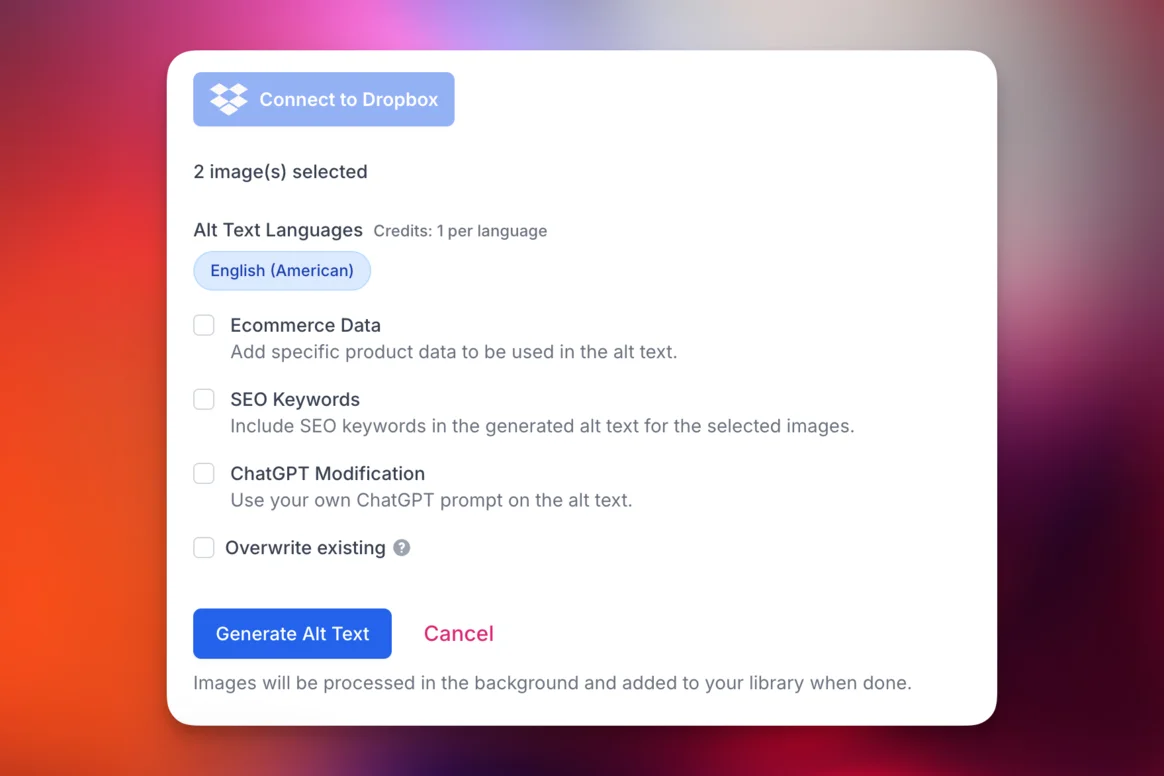
Click the Connect to Dropbox button and the familiar Dropbox file picker opens. Select individual images or multiple files at once—no API tokens to manage, no webhooks to configure.
Multi-File Selection
Select multiple images at once from the Dropbox file picker. Choose files from any folder you have access to and process them all in a single batch.
Export Options
Download generated alt text as a CSV file for use in other tools, or keep it stored in your AltText.ai library for later reference.
How Dropbox Alt Text Generation Works
Get started in under 2 minutes:
Open File Picker
Sign in to AltText.ai and click "Connect to Dropbox" in your dashboard. The Dropbox file picker opens.
Select Images
Browse your Dropbox and select the images you want to process. Pick multiple files at once from any folder.
Process in Bulk
Click process and our AI generates descriptions for every image. View results in your library or export as CSV.
Why Use AltText.ai for Your Dropbox Library
Built for teams who store images in the cloud:
No Complex Setup
Skip Zapier, Make, or custom scripts. Just click Connect to Dropbox, select your images from the file picker, and you're processing in under 2 minutes.
True Bulk Processing
Process thousands of images in a single batch. No per-image clicking, no rate limiting on your end. Our infrastructure handles the volume.
Flexible Export
Export alt text as CSV to import into your CMS, DAM, or database. Match images by filename for easy bulk updates elsewhere.
Context-Aware AI
Our AI generates natural language descriptions, not just tags. Each image gets a complete sentence suitable for screen readers and SEO.
Multi-Language Support
Generate alt text in 130+ languages. Process your library in English, then export translations for international content needs.
Secure Processing
Images are accessed via Dropbox's secure sharing links. We process them in memory and don't store copies of your original files.
AltText.ai vs. Manual Dropbox Alt Text
Manual Process
- Download images, process one by one
- Use complex automation tools like Zapier
- Write custom scripts to handle batch processing
- Manually update spreadsheets or databases
AltText.ai Integration
- Pick files from Dropbox—no downloads needed
- Select images, click process, done
- Built-in bulk processing for many images at once
- CSV export ready for any destination
Common Dropbox + AltText.ai Workflows
Photography Portfolio Management
Photographers store client galleries in Dropbox. Generate alt text for entire shoots, then export CSV to import into your portfolio website or client delivery system.
Used by: Professional photographers, photo agencies, stock photographers
Marketing Asset Libraries
Marketing teams maintain asset libraries in Dropbox. Process campaign images in bulk, export alt text, and import into your CMS or DAM for website use.
Used by: Marketing teams, brand managers, creative agencies
Archive Digitization
Libraries and archives scan historical images to Dropbox. Generate descriptions for thousands of digitized photos, documents, and artwork for accessibility and searchability.
Used by: Museums, libraries, historical societies, universities
E-commerce Product Photos
Product photographers deliver to Dropbox. Generate alt text before images ever reach your store, ensuring every product photo ships with SEO-optimized descriptions.
Used by: E-commerce brands, product photography studios
What Dropbox Users Say
"I had 15,000 product images in Dropbox with no alt text. Processing them manually would have taken weeks. AltText.ai did it in an afternoon and the CSV export imported perfectly into Shopify."
Michelle Torres
E-commerce Operations Manager
"We digitize historical photographs for a university archive. Generating descriptions for each image used to be our biggest bottleneck. Now we process thousands at once."
David Chen
Digital Archivist
"Simple and effective. Connect Dropbox, select folder, click process. The alt text quality is excellent and the CSV export format works perfectly with our CMS."
Lisa Johannsen
Content Manager
Simple, Transparent Pricing
Annual plans include rollover credits. Pick the tier that matches your image volume.
Bronze
Perfect for personal blogs and portfolios
$49/year
1,200 credits (4¢ per image)
View Bronze planSilver
Growing websites and small businesses
$189/year
6,000 credits (3¢ per image)
View Silver planGold
E-commerce stores and content teams
$489/year
24,000 credits (2¢ per image)
View Gold planPlatinum
Enterprise publishers and platforms
$2199/year
120,000 credits (<2¢ per image)
View Platinum planNeed more? Contact us for enterprise pricing.
Dropbox Alt Text FAQs
FAQ
-
Not directly—Dropbox doesn't have a native alt text field. The generated descriptions are stored in your AltText.ai library and can be exported as CSV. From there, you can import into your CMS, DAM, or any system that uses alt text.
-
We support all common image formats: JPG, PNG, WebP, GIF, TIFF, and more. Any image Dropbox can display, we can analyze and generate alt text for.
-
Yes. The file picker shows any folder you have access to in Dropbox, including shared folders and team spaces. Dropbox Paper documents aren't supported—just images.
-
Processing speed depends on image count and size. Typically, we process several hundred images per minute. A library of 5,000 images usually completes in 15-30 minutes. Processing happens in the background—you don't need to keep your browser open.
-
Yes. In your AltText.ai account settings, you can set a Final Pass prompt to guide the AI. Want shorter descriptions? Product-focused language? Specific formatting? The AI follows your instructions while maintaining accessibility best practices.
-
New images need to be processed separately. Our Dropbox integration is on-demand—you select images and process when you're ready. For automatic processing of new uploads, consider our Cloudinary or Storyblok integrations which use webhooks.
-
We use Dropbox's official Chooser file picker, which creates secure temporary links to your files. Images are accessed directly from Dropbox, processed in memory, and not stored on our servers—only the generated alt text is kept in your library.
Nothing found.
If you can't find what you're looking for, please contact our customer support team.
Related Solutions
Need alt text for other platforms? We integrate with these too:
Cloudinary Alt Text Integration
Webhook-based automation for Cloudinary DAM with bulk import.
Bulk Processing Options
Process images via API, CSV upload, or URL scraping.
Pinterest Alt Text Generator
Generate optimized alt text for your Pinterest pins.
Accessibility Compliance
Learn how AI-generated alt text helps meet WCAG 2.1 requirements.
Ready to Process Your Dropbox Library?
Connect your Dropbox account and generate alt text for thousands of images. No complex setup required.
Free trial, no credit card needed. 25 images included.