WordPress Alt Text as Captions: 5 Ways to Display Accessible Image Descriptions
Your WordPress site has hundreds of images with carefully written alt text, but visitors never see those descriptions. Captions sit empty because nobody wants to write the same thing twice.
The fix: display alt text as visible captions automatically. Here are five ways to do it—each with real trade-offs—so you can pick the one that fits how you actually work.
Alt Text vs Captions: Why WordPress Keeps Them Separate
WordPress stores alt text and captions in different database fields with different purposes:
- Alt text (
_wp_attachment_image_altinwp_postmeta): Describes the image for screen readers and search engines. Not visible on the page. - Caption (
post_excerptinwp_posts): Visible text below the image, rendered as a<figcaption>element.
If the caption field is empty, WordPress shows nothing below the image—even when perfectly good alt text exists. The methods below bridge that gap.
Method 1: Copy It Manually
The simplest approach: when uploading images, fill the alt text field first, then paste the same text into the caption field.
In Gutenberg, the Image block shows both fields—alt text in the right sidebar under "Settings," and the caption directly below the image in the editor.
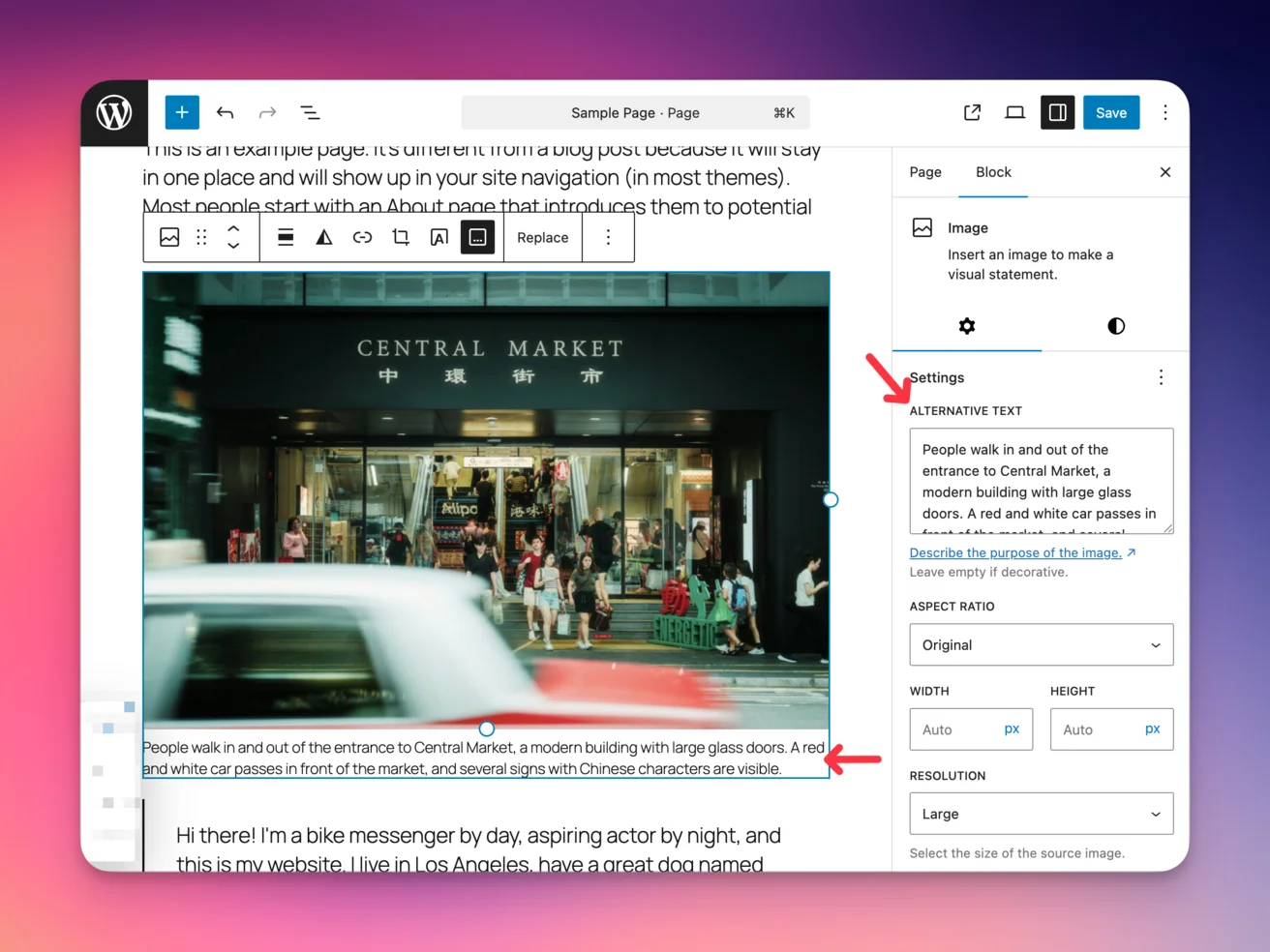
This works for a handful of images, but breaks down fast. You're doing double the work on every upload, and if you update alt text later, the caption doesn't follow. For anything beyond a personal blog, you need automation.
Method 2: Custom Theme Code
WordPress provides two hooks that can automate caption generation. A the_content filter can scan post content for captionless images and wrap them in <figure> and <figcaption> elements using their alt text. For featured images specifically, you can modify your theme's template files to check wp_get_attachment_caption() and fall back to the alt text stored in post meta.
The filter approach is the more powerful of the two—it catches every image in every post automatically. The template approach gives you finer control over placement and styling, but only covers the images you explicitly template for.
The cost: you're maintaining custom PHP in a child theme. Theme updates won't overwrite it if you've set up the child theme correctly, but you're still responsible for debugging if a WordPress core update changes how content filters or image attributes work. For developer-run sites, that's fine. For sites managed by content teams, it's a support burden.
Method 3: JavaScript (Client-Side)
If you can't modify PHP files or don't have child theme access, a front-end script can achieve the same result. A small DOM script on page load finds every <img> with a non-empty alt attribute, checks whether it's already inside a <figure> with a <figcaption>, and wraps the rest in new figure/caption markup.
You can add this through your theme's JavaScript file, a code snippets plugin, or even Google Tag Manager. It's the lowest-barrier technical option since you don't need FTP or file editor access.
The catch is fundamental: captions don't exist in the HTML until JavaScript executes. Googlebot renders JavaScript, but not always on the first pass. Screen readers may or may not pick up DOM changes depending on timing. For a feature that's supposed to improve both SEO and accessibility, client-side rendering undermines both goals.
Method 4: Caption Plugins
Several free plugins handle alt-to-caption conversion without custom code:
| Plugin | Approach | Best For |
|---|---|---|
| Auto Caption Images | Copies alt text to caption field on upload. One-click bulk action for existing images. | One-time migration |
| Image Alt Text Caption | Dynamically displays alt text as caption without modifying the database. | Sites that update alt text frequently |
| WP Accessibility | Full accessibility toolkit with an "add captions from alt text" option. | Sites focused on overall accessibility |
These solve the caption problem, but they all assume you've already written alt text for every image. If your media library has hundreds of images with blank alt text fields, generating captions from nothing isn't helpful.
Method 5: Generate Alt Text and Captions Automatically
The first four methods all share the same limitation: they need some sort of image description to already exist. For most WordPress sites, that's the real bottleneck. Writing quality alt text for every image takes 30-90 seconds each—time that adds up fast on content-rich sites.
AltText.ai's WordPress plugin handles both steps at once. It generates accurate, descriptive alt text using AI and can automatically set the caption field with the same text—no manual copying, no theme code, no extra plugins.
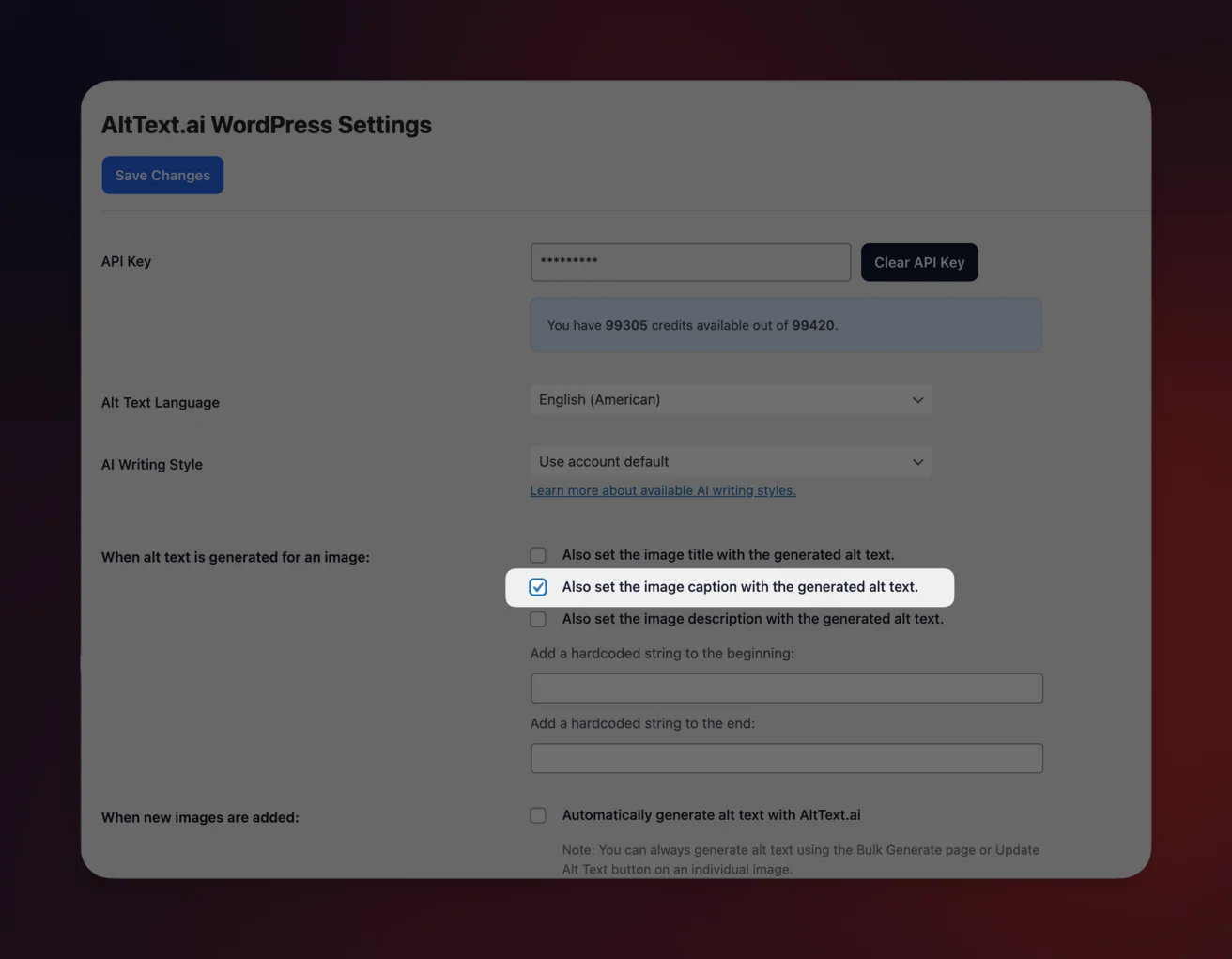
Check "Also set the image caption with the generated alt text" in the plugin settings and every new image gets both fields populated automatically. Bulk processing handles your existing library—even sites with thousands of images.
Because the alt text and caption are set at the same time from the same source, you avoid the sync problems that plague manual workflows and theme-based solutions. Update one and the other stays consistent.
Watch Out for Screen Reader Redundancy
Whichever method you choose, be aware that identical alt text and caption text creates redundancy for screen reader users. When both fields contain the same words, assistive technology announces the description twice: once for the alt attribute and once for the <figcaption>.
The cleanest fix is a WordPress filter that empties the alt attribute when a caption is present, so the caption alone provides the description.
And not every image should use alt text as its caption. When the caption adds context beyond what the image shows—attribution, data sources, links to related content—keep the fields separate.
Automate WordPress alt text and captions
The AltText.ai plugin generates accurate alt text on upload and sets captions automatically. Bulk processing fixes your entire media library in minutes.