How to Automate Image Alt Text in WordPress: A Complete Walkthrough
A complete step-by-step guide to automating alt text generation in WordPress
Optimizing every single WordPress picture for search engines and accessibility standards is often the most tedious part of content management. Whether you are managing a personal blog or a massive agency site, the process of manually describing images slows down your workflow significantly. Yet, skipping this step risks ADA lawsuits and leaves valuable SEO traffic on the table.
Fortunately, AI technology has evolved to solve this specific bottleneck. In this guide, we will walk you through exactly how to automate this process using the AltText.ai plugin, ensuring your media library is fully optimized without you typing a single word.
Key Takeaways
- Save Time: Eliminate manual writing by automating alt text generation for every new upload.
- Boost SEO: Improve your site's ranking potential by ensuring every WordPress picture has descriptive, keyword-rich text.
- Ensure Compliance: Meet Web Content Accessibility Guidelines (WCAG) and ADA standards effortlessly.
- Bulk Processing: Learn how to fix thousands of existing images in your library with just a few clicks.
- Seamless Integration: Discover how the plugin integrates directly into your existing WordPress workflow.
Why Every WordPress Picture Needs Alt Text
Before we dive into the "how," it is crucial to understand the "why." When you upload a WordPress picture, it is more than just a visual element; it is a piece of data that search engines and screen readers need to interpret.
Accessibility is Not Optional
For visually impaired users relying on screen readers, alt text is the only way to understand the content of your images. Without it, a meaningful infographic or product photo is just announced as "image123.jpg," creating a frustrating and inaccessible user experience.
SEO and Traffic
Google cannot "see" a WordPress picture the way a human does. It relies on alt text to understand the context of the image. By automating this, you ensure that your images appear in Google Image Search results, driving a significant amount of additional organic traffic to your site. This is where a reliable alt text plugin becomes a critical tool in your SEO stack.
The Problem with Manual Alt Text
If you are a blogger with one post a month, writing alt text manually is manageable. However, for agency owners and content managers handling high-volume sites, manual entry is a productivity killer.
Imagine uploading 50 photos for a travel blog or 200 product variants for a WooCommerce store. Writing unique, descriptive text for each WordPress picture could take hours. This manual friction often leads to one of two bad outcomes: generic, copy-pasted text (which hurts SEO) or skipping alt text entirely (which hurts accessibility).
To automate SEO WordPress workflows effectively, you need a solution that integrates directly into the media library.
How to Automate Image Alt Text in WordPress
The most efficient way to solve this is by using the AltText.ai WordPress plugin. It uses advanced computer vision to analyze your images and generate human-like descriptions automatically.
Watch this quick video walkthrough to see the entire process:
Here is your detailed, step-by-step installation and configuration guide.
Step 1: Install and Activate the Plugin
First, you need to get the plugin running on your site.
- Log in to your WordPress Admin Dashboard.
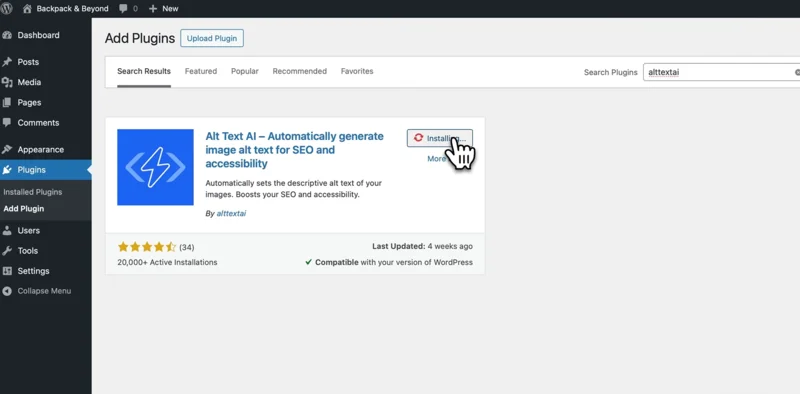
- Navigate to Plugins > Add New on the left-hand sidebar.
- In the top-right search bar, type "AltText.ai".
- Locate the plugin titled "AltText.ai - Automatically Generate Image Alt Text for SEO and Accessibility".
- Click the Install Now button.
- Once the installation is complete, click the blue Activate button.
Step 2: Connect Your AltText.ai Account
Once activated, you need to link the plugin to your account to enable the AI features.
- After activation, navigate to Settings > AltText.ai in your dashboard sidebar.
- You will see a text field asking for your API Key.
- Open a new browser tab and log in to your AltText.ai dashboard. If you don't have one, you can sign up for a free trial.
- Go to the API section of your account profile.
- Copy your unique API Key string.
- Return to your WordPress tab, paste the key into the field, and click Save Changes.
Note: The settings screen will show a green "Connected" status message once your API key is validated, confirming that your WordPress picture workflow is ready for automation.
Step 3: Configure Your Automation Settings
Now comes the powerful part. You can configure exactly how and when the alt text is generated.
- Enable Automation: In the plugin settings, check the box labeled "Automatically update on upload". This ensures that every time you add a new WordPress picture to the Media Library, the AI immediately analyzes it and writes the text.
- SEO Integration: If you use plugins like Yoast SEO or RankMath, look for the "SEO Keywords" setting. Enable this to let the AI read your focus keyphrase from the post and incorporate it naturally into the alt text.
- Language Selection: Locate the "Language" dropdown menu. If your site targets a non-English audience, select your specific language here (we support over 130 options).
- Save Changes: Click the save button at the bottom to finalize your configuration.
Setting this up once means you never have to worry about a missing tag again. The alt text plugin will now run quietly in the background.
Bulk Optimizing Your Existing Library
For many users, the challenge isn't just new content, it's the thousands of images already on their site. A typical WordPress picture uploaded three years ago likely has no alt text.
The AltText.ai plugin includes a Bulk Generate feature:
- Navigate to Media > Library.
- Switch to the "List" view (the icon that looks like a list, not the grid).
- Select the check-boxes next to the images you want to update (or click the top box to select all on the page).
- In the "Bulk Actions" dropdown menu at the top, choose "Generate Alt Text (AltText.ai)".
- Click Apply.
The plugin will process your queue in the background. This is a game-changer for wordpress accessibility remediation projects, allowing you to bring an entire site into compliance in a single afternoon.
Advanced Features for Agencies and Ecommerce
If you are running an agency or a WooCommerce store, simple descriptions might not be enough. You need context.
WooCommerce Integration
Product images need to sell. A generic description like "red shoe" isn't helpful. Our plugin can read your WooCommerce product name and category, combining that data with the visual analysis. This ensures the generated text for a specific WordPress picture is relevant to the product being sold, boosting your ecommerce SEO.
CSV Import/Export
For massive content migrations, you can use the AltText.ai web interface to process images via CSV and then sync the data back to WordPress. This flexibility makes it the ultimate alt text plugin for enterprise-level management.
Brand Safety and Quality
The AI is trained to be accurate and neutral. However, you always maintain full control. You can review the generated text in the Media Library and edit it if necessary, though most users find the AI's output for a standard WordPress picture to be spot-on.
Conclusion
The days of manually staring at a WordPress picture and trying to come up with a description are over. By automating this process, you free up valuable time to focus on content creation and strategy.
Automation does not mean sacrificing quality. In fact, AI-generated alt text is often more consistent and descriptive than what human editors produce when they are rushing to meet a deadline. Whether you are looking to automate SEO WordPress tasks or ensure strict wordpress accessibility compliance, AltText.ai provides the robust, set-and-forget solution your website needs.
Ready to stop writing alt text manually?
Download our WordPress Plugin for free and automate your next upload.
Frequently Asked Questions
-
No, quite the opposite. Search engines prefer content that is fully accessible and descriptive. By ensuring every WordPress picture has relevant, keyword-aware alt text, you improve your site's overall SEO health and visibility in image search results.
-
Yes. The plugin features a powerful Bulk Optimizer tool that allows you to scan your entire existing library and generate alt text for any image that is missing it, saving you hours of manual work.
-
Yes, because AltText.ai adds the text directly to the image metadata in the WordPress Media Library, it works seamlessly with Elementor, Divi, Beaver Builder, and the native Gutenberg block editor.
-
AltText.ai supports over 130 languages. You can configure the plugin to generate alt text in the specific language of your website, ensuring your WordPress picture descriptions match your content language.
-
Absolutely. We have specific integrations for WooCommerce that allow the AI to incorporate product names and categories into the alt text, making it highly effective for ecommerce SEO.
Ready to automate your WordPress alt text?
Start your free trial of AltText.ai and automatically generate accurate, accessible alt text for every image. No credit card required.