Pinterest Alt Text & Descriptions: The 2026 SEO Playbook
The bridge between beautiful images and traffic that converts: mastering Pinterest descriptions for discovery
Your Pinterest Description is the bridge between a beautiful image and a click that drives traffic. While many marketers focus heavily on Google SEO, Pinterest requires a unique approach that blends visual appeal with strategic text. Unlike Google, which often relies on surrounding page content, Pinterest treats every pin as a standalone entity where your description provides critical context. Ignoring this space means missing out on millions of visual search queries.
In this guide, we will explore the key differences between the two platforms and show you how to craft descriptions with AltText.ai that turn scrollers into loyal customers.
Key Takeaways
- Platform Differences: Google Images relies on page context and alt text, while Pinterest uses descriptions, board names, and user engagement.
- Visual Search Engine: Pinterest is a discovery engine where keywords in your description directly influence visibility.
- Automation: Tools like AltText.ai can import from Pinterest and update descriptions in bulk, saving hours of manual work.
- Keyword Strategy: Natural language with relevant keywords works better than stuffing tags.
- User Intent: Pinterest users are often in a planning phase, making descriptive and inspiring text essential for conversions.
Table of Contents
- The Battle of Visual Giants: Pinterest vs. Google Images
- Why Your Pinterest Description Matters for SEO
- How to Write the Perfect Pinterest Description
- Automating Your Workflow with AltText.ai
- Visual Search Optimization: Beyond the Text
- Common Mistakes to Avoid
- Case Study: The Power of Bulk Optimization
- FAQs
The Battle of Visual Giants: Pinterest vs. Google Images
To master visual search, you must first understand the playground. Google Images and Pinterest might look similar, infinite grids of pictures. But their algorithms function very differently.
Google Images: The Context King
Google Images is largely a reflection of your website. It crawls your webpages, looking at the filename, the surrounding text, and importantly, the alt text. If your image is embedded in a blog post about "vegan chocolate cake," Google uses that article's authority to rank the image. The image is rarely "read" in isolation; it is tied to the page it lives on.
Pinterest: The Discovery Engine
Pinterest is different. It is less of a social network and more of a visual search engine. Here, a Pinterest Description holds immense weight because the image often travels without the original blog post attached. When a user repins your content, that description travels with it. The algorithm looks at the specific words you have used to categorize and recommend that pin to others.
Why Your Pinterest Description Matters for SEO
You might have the most stunning graphic in your niche, but without text, the algorithm is blind. A well-optimized Pinterest Description acts as a map for the search bots. It tells the system exactly what your image is about and, more importantly, who should see it.
When you type a query into Pinterest, the platform scans millions of pins to find a match. It does not just look at the image pixels; it reads the text associated with that image. If you have left the description blank or filled it with generic filename text like "IMG_5432.jpg," you are effectively invisible.
Furthermore, Pinterest feeds Google. High-performing pins often rank in Google Image search results. By optimizing your description for Pinterest, you are actually performing a double-duty SEO maneuver that can capture traffic from both search engines.
How to Write the Perfect Pinterest Description
Writing for Pinterest is an art form. You need to balance keyword inclusion with inviting, human-readable copy. Here is how to strike that balance.
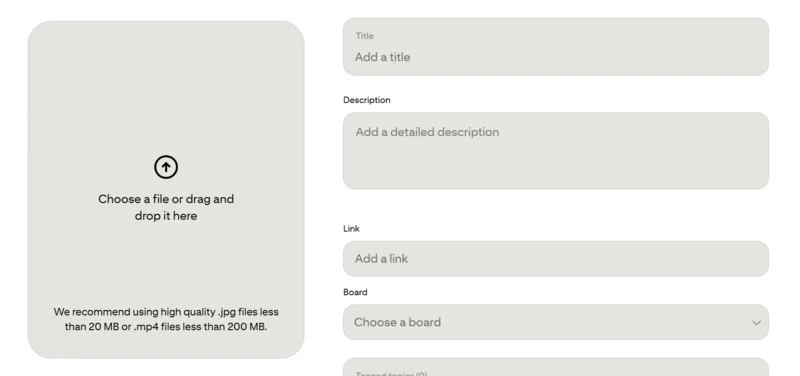
1. Focus on the "Why" and "What"
Start by describing what is in the image, but quickly pivot to why it matters. Is it a solution to a problem? An inspiring idea for a home renovation? Use the first sentence to hook the reader.
2. Use Natural Keywords
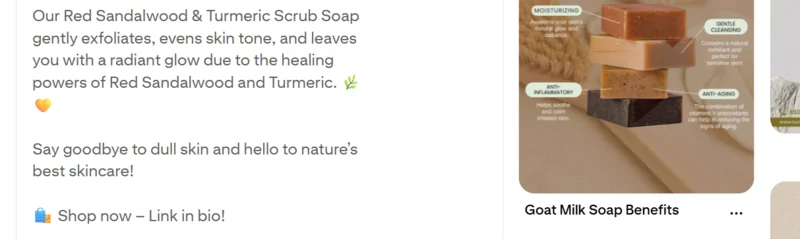
Gone are the days of hashtag stuffing. Pinterest prefers full sentences. Instead of listing "summer, fashion, dress, red," write "This stunning red summer dress is perfect for your next beach vacation fashion look." This approach helps you rank for long-tail queries.
3. Include a Call to Action (CTA)
Do not leave the user guessing. Tell them what to do next. "Click to read the full recipe," "Shop the look," or "Download the free checklist" are effective ways to drive click-throughs.
Automating Your Workflow with AltText.ai
Let's face it: writing a unique, keyword-rich Pinterest Description for hundreds of images is tedious. It is the kind of bottleneck that slows down marketing teams and frustrates content creators. This is where AltText.ai transforms your workflow.
Our tool isn't just for website alt text; it is a powerhouse for Pinterest optimization. We have built specific integrations that allow you to import images directly from your Pinterest boards.
Watch this quick walkthrough to see the Pinterest integration in action:
How It Works
You can connect your Pinterest account to AltText.ai and select entire boards or individual pins. Our advanced AI analyzes the image context and generates a descriptive, SEO-optimized text. You can even set it to automatically update the Pinterest Description on the live pin. This means you can fix thousands of pins with poor or missing descriptions in a single afternoon, rather than months of manual typing.
Visual Search Optimization: Beyond the Text
While text is crucial, visual search technology (like Pinterest Lens) is getting smarter. It analyzes the shapes, colors, and objects within your image. However, the text validates what the AI "sees."
If the visual AI identifies a "modern blue sofa" but your Pinterest Description says "vintage red chair," the algorithm gets confused. This disconnect hurts your ranking. Consistency is key. Ensure your description accurately reflects the visual elements.
The Role of Alt Text on Pinterest
Many users confuse the pin description with alt text. On Pinterest, alt text is a separate field used specifically for accessibility. However, if a pin description is missing, some platforms might default to pulling the alt text. Using AltText.ai ensures you have both bases covered. You can generate accessibility-compliant alt text for your website images (which Pinterest often scrapes when a user saves directly from your site) and distinct marketing descriptions for the pins themselves.
Common Mistakes to Avoid
Even seasoned marketers fall into traps. Here are a few pitfalls to watch out for:
- Keyword Stuffing: We mentioned this before, but it bears repeating. A Pinterest Description that looks like a spam list will be demoted by the algorithm.
- Being Too Vague: "Cute outfit" is not enough. "Boho chic floral maxi dress for fall weddings" is what users are actually searching for.
- Broken Links: Great descriptions that lead to 404 pages result in high bounce rates, signaling to Pinterest that your content is low quality.
Case Study: The Power of Bulk Optimization
Imagine an e-commerce brand with 5,000 products pinned over the last five years. Most of these pins likely have descriptions that are just the product name. By using AltText.ai to bulk update these pins, the brand can inject rich keywords into every single Pinterest Description.
The result? Old content becomes new again. Pins that were dormant start appearing in search results because they finally have the data the algorithm needs. This is one of the most cost-effective ways to increase traffic because you are leveraging assets you already have.

Optimize Your Pinterest Descriptions
Ready to transform your Pinterest strategy? Connect your boards to AltText.ai and automatically generate SEO-optimized descriptions for every pin. Start your free trial and see results in hours, not months.
Conclusion
Mastering Pinterest requires shifting your mindset from "social sharing" to "search optimization." Your Pinterest Description is the lever that moves your content from obscurity to the top of the search results. By understanding the differences between Google and Pinterest, and leveraging automation tools like AltText.ai, you can ensure your visual content works as hard as you do.
Don't let your beautiful images get lost in the feed. Start treating your descriptions with the strategic importance they deserve.
Ready to one-up your Pinterest strategy? Start your free trial with AltText.ai today and optimize your entire library in minutes.
FAQs
-
Ideally, you should aim for descriptions between 100 to 500 characters. While you have room for more, the first 50-60 characters are the most critical because they are what users see first in the feed.
-
It is not recommended. Instagram captions often rely on emojis and conversational engagement, while a Pinterest Description should be optimized for search intent and keywords. Tailor your text for the platform.
-
Yes! You can use our tool to generate descriptions that are rich in detail and keywords. You can even customize the prompt to ensure the tone matches your brand's voice on Pinterest.
-
If you have high-quality pins that are not performing well, refreshing the Pinterest Description with current keywords can give them a second life. A quarterly audit of your top boards is a great strategy.
-
The title is the bold headline that appears on the pin, usually up to 100 characters. The description provides the details and context. Both are essential, but the description allows for more comprehensive keyword integration.
Related resources
- Best Practices for Writing Effective Alt Text
- Holiday SEO 2025: AI Alt Text
- Image Alt Text SEO Best Practices
- Alt Text Generator
Ready to automate your Pinterest descriptions?
Start your free trial of AltText.ai and automatically generate accurate, SEO-optimized descriptions for every pin. No credit card required.