The Ultimate Web Accessibility Checklist: Is Your Site WCAG 2.1 Compliant?
A comprehensive guide to achieving WCAG 2.1 compliance with automated image accessibility solutions
In today's rapidly evolving digital landscape, accessibility is no longer just a nice-to-have feature; it is a fundamental necessity. Achieving WCAG Compliance ensures that your website is usable by everyone, including people with visual, auditory, or motor disabilities. However, navigating the complex Web Content Accessibility Guidelines (WCAG) 2.1 can often feel overwhelming for developers and business owners alike. From strict color contrast ratios to complex keyboard navigation requirements, the standards are rigorous. One of the most frequent points of failure is missing or poor alternative text for images. In this guide, we will walk you through a comprehensive strategy to audit your site and introduce AltText.ai, a powerful tool designed to automate your image accessibility and solve compliance headaches instantly.
Key Takeaways
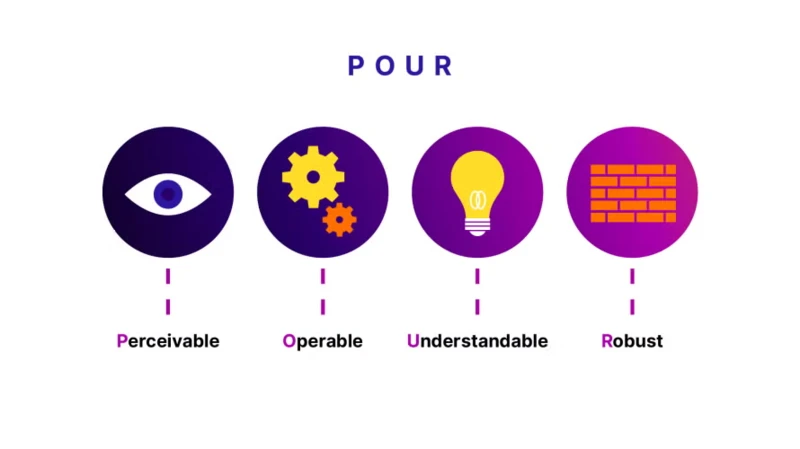
- WCAG 2.1 is built on four core principles (POUR): Perceivable, Operable, Understandable, and Robust.
- Image accessibility is often the most difficult standard to maintain at scale but is critical for WCAG Compliance.
- AltText.ai leverages advanced AI to generate accurate, compliant alt text automatically, saving hours of manual work.
Understanding the Core of WCAG Compliance
Before diving into the audit, it is crucial to understand what WCAG Compliance actually aims to achieve. The guidelines are organized under three levels of conformance: Level A (minimum), Level AA (standard), and Level AAA (optimal). Most legal regulations, such as the ADA in the US or EAA in Europe, specifically target Level AA.
The framework is built upon four foundational pillars, known as POUR. Your content must be Perceivable, meaning information isn't invisible to a user's senses. It must be Operable, ensuring the interface doesn't require interactions a user cannot perform. It must be Understandable, so the information and operation are clear. Finally, it must be Robust, meaning the content can be interpreted reliably by a wide variety of user agents, including assistive technologies.
The Ultimate WCAG 2.1 Audit Guide
To ensure WCAG Compliance, you need to look at your website through the lens of these four pillars. Instead of a dry checklist, consider this a narrative guide to auditing your user experience.
1. Making Content Perceivable
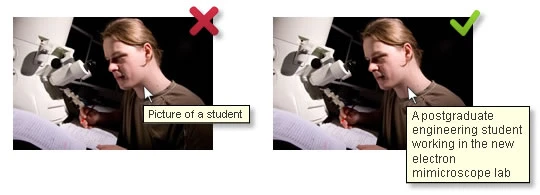
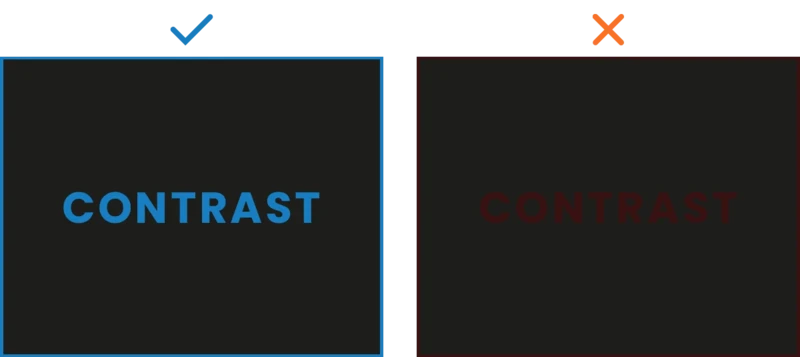
The first step in your audit is ensuring that users can actually consume the content you present. This primarily revolves around text alternatives and contrast. According to Success Criterion, all non-text content, such as images and icons, must have text alternatives so that screen readers can describe them to visually impaired users. Additionally, you must evaluate your color palette. Normal text requires a contrast ratio of at least 4.5:1 against the background. If your design features light grey text on a white background, you are likely failing this requirement. Finally, ensure that all video content includes synchronized captions, making the media accessible to those with hearing impairments.
2. Ensuring the Interface is Operable
Operability focuses on how a user navigates your site. A critical test for WCAG Compliance is keyboard accessibility. You should be able to navigate your entire website using only the "Tab" key. If you get stuck in a menu or a form, known as a "keyboard trap", the site fails the audit. Furthermore, users need a way to bypass repeated blocks of content, such as navigation headers, usually via a "Skip to Content" link. It is also vital that the keyboard focus indicator is clearly visible; users navigating by keyboard need to see exactly which link or button is currently selected.
3. Creating Understandable Content
Your website must function in a predictable way. This means that when a user inputs data or changes a setting, the context shouldn't change unexpectedly. For example, selecting an item from a dropdown menu shouldn't automatically submit a form unless the user is warned beforehand. WCAG Compliance also dictates that the language of the page (e.g., <html lang="en">) must be programmatically determined so screen readers use the correct pronunciation. When errors occur in forms, they must be identified in text, and suggestions for correction should be provided to the user.
4. Building Robust Code
The final pillar ensures compatibility with current and future tools. This is largely a technical requirement ensuring your HTML is clean. Elements must have complete start and end tags, and IDs must be unique. More importantly, custom user interface components need the correct "Name, Role, and Value" labels so that assistive technologies understand what the component is and what state it is in.
The Image Accessibility Challenge
While fixing code syntax or adjusting color contrast is often a "one-and-done" task during the development phase, maintaining WCAG Compliance for images is an ongoing, operational battle. Every time a content editor uploads a new blog photo, a product image, or a team headshot, your compliance status is at risk if they forget to add the alternative text.
For an image to be truly compliant, the alt text cannot just be a keyword dump. It needs to be accurate, describing what is actually visible. It should be succinct, avoiding unnecessary "image of" phrases, and it must be contextual to the surrounding content. Most websites fail here simply because writing unique, high-quality descriptions for libraries containing thousands of images is incredibly tedious and prone to human error.
Automating Compliance with AltText.ai
This is where AltText.ai becomes an indispensable asset for your web accessibility strategy. It is an AI-powered solution specifically engineered to solve the text alternative requirement of WCAG Compliance without the manual grunt work.
Why AltText.ai is the Solution
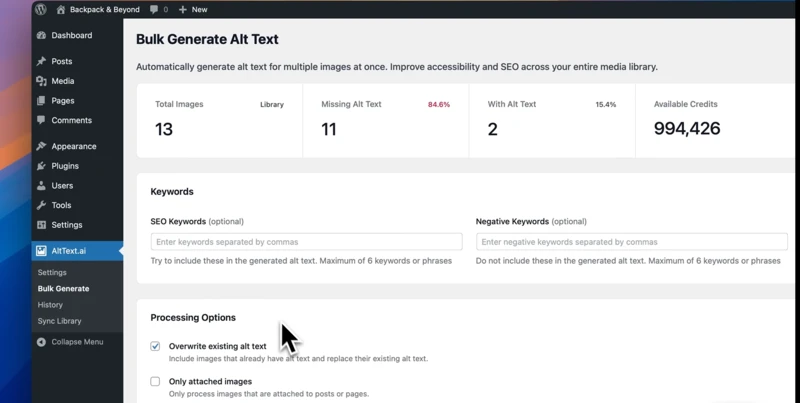
Manual entry is no longer sustainable for growing websites. AltText.ai analyzes the visual content of your images and generates descriptive, human-like text that meets accessibility standards. It integrates seamlessly with major platforms like WordPress, Shopify, and various CMS frameworks, and can even be integrated into custom builds via API.
Streamlining Your Workflow
The tool offers powerful bulk generation capabilities. If you have an archive of 5,000 images with missing alt tags, AltText.ai can scan your library and populate them in minutes, instantly elevating your WCAG Compliance score. Beyond just compliance, the tool aids in SEO optimization. It can naturally incorporate your focus keywords into the descriptions, ensuring you rank higher while remaining accessible.
Furthermore, the AI is sophisticated enough to handle complex imagery. It supports over 130 languages, making it perfect for global sites, and uses optical character recognition (OCR) to read text embedded within images, ensuring that no information is lost to screen reader users.
Audit Your Site for WCAG Compliance
Run a free Website Accessibility Analyzer scan to identify which images need alt text, check contrast ratios, and discover accessibility issues preventing WCAG 2.1 compliance.
Conclusion
Achieving full WCAG Compliance is a journey, not a destination. It requires regular audits and a commitment to inclusive design principles. While structural elements like navigation and code parsing require developer attention, your dynamic content, specifically images, requires a scalable, automated solution. By following the audit guide above and integrating tools like AltText.ai, you can ensure your digital presence is welcoming to all users while protecting your business from legal risks.
Don't let a simple missing alt tag be the reason your site fails an audit. Stop risking accessibility lawsuits. Automate your image text today with the AltText.ai Plugin.
FAQs
-
No tool can guarantee 100% compliance on its own because WCAG Compliance covers a broad spectrum of requirements, including keyboard navigation, color contrast, and video captions. However, AltText.ai fully resolves Success Criterion 1.1.1 (Non-text Content), which is one of the most common and difficult failure points for content-heavy websites.
-
For strict WCAG Compliance, decorative images that add no information should have an empty alt attribute. AltText.ai allows you to filter images or manually mark them as decorative. This ensures the AI focuses only on generating descriptions for images that convey meaning, keeping your code clean and semantic.
-
Yes. The guidelines require that text alternatives serve an equivalent purpose to the non-text content. As long as the AI generation is accurate, which AltText.ai excels at, it meets the standard. It is always recommended to spot-check descriptions for highly complex or critical images to ensure context is perfectly captured.
-
Absolutely. E-commerce sites often struggle with WCAG Compliance due to the sheer volume of product images. AltText.ai has a dedicated Shopify app that automatically generates descriptions for product images. It can even include relevant product details like color and type, enhancing both accessibility and user experience.
-
Images of text are generally discouraged in accessible design, but if they are necessary, WCAG Compliance requires the alt text to contain the exact words shown in the image. AltText.ai utilizes optical character recognition (OCR) features to detect and include this embedded text in the description, ensuring no information is lost.
Related resources
- WCAG 2.1 Image Accessibility: The Essentials
- Website Scanner (free)
- Best Practices for Writing Effective Alt Text
- Alt Text at Scale: Boost Accessibility & SEO for Ecommerce
Ready to automate your alt text?
Start your free trial of AltText.ai and automatically generate accurate, accessible alt text for every image. No credit card required.