How to Build a Shopify Commerce Agent That Writes Its Own Alt Text
Shopify writes seven product fields for the agent. It never writes this one, and whether the agent receives it depends on which call you made.
Writing alt text gets you a field in Shopify. It does not get you a field in the agent's payload. Shopify generates seven product fields for the AI agent. It never generates this one. And whether the agent then receives it depends on two things. Which UCP operation it called, and which slot it read.
If you run the store rather than build the agent, the short answer is two tools. Shopify's Catalog fills in seven product fields for AI agents. It never fills the image description. Nothing writes that field unless you do. You need something that writes alt text into Shopify. Here that is AltText.ai, through its MCP server. And you need to check the agent received it. Here that is Shopify's own UCP CLI, reading the catalog back. This post builds both. For the merchant-level version of why agents need this at all, see UCP and accessible product images. Two blocks from one response. Same store, same query, same second. Look at the URLs.
"media": [{
  "type": "image",
  "url": ".../salty-og-01-main-8pack_0239818b-617a-4a9a-a2c4-470b94a76afc.png?v=1789413204",
  "alt_text": "Salty Syrup Original 8 pack bag with a pouch, maple syrup, vanilla and pink salt"
}]
"media": [{
"type": "image",
"url": ".../salty-og-01-main-8pack_0239818b-617a-4a9a-a2c4-470b94a76afc.png?v=1789413204"
}]That is the same file, character for character. The second block is how catalog search returned it in the variant slot. The first is the same call returning it in the product slot, ninety-six lines later in the response. One copy has a description. The other has no alt_text key at all.
The order is the part that costs you. A parser walking the response meets the blank copy first, twice. It reaches the described one near the end. Stop at the variant and you have dropped a description that was already in your hands.
Your agent reads one of those two. Which one it gets is a property of your retrieval code, not of the store.
What Shopify writes for the agent
Shopify's Global Catalog marks certain product fields Inferred, meaning Shopify's own AI generates them. The docs are blunt about what that costs you:
Some fields might be inferred by Shopify's AI and might not always be present or have varying accuracy depending on available product data.
Seven fields carry the label: description, options, metadata.attributes, metadata.tech_specs, metadata.top_features, metadata.unique_selling_points, and variants[].condition. Checked on shopify.dev on 2026-09-21.
media[].alt_text is not one of them. Shopify will generate your unique selling points. It will not describe your photograph. If you want that field filled, something you run has to populate it.
Before you start
Six things, with the versions this run printed:
- Node.js 18 or later
- Claude Code 2.1 or later, where
claude plugin installarrives. This machine printed2.1.273 (Claude Code) - Shopify CLI. This machine printed
4.8.0 - An AltText.ai API key with credits on the account
- A dev store.
shopify store create devexists in CLI 4.8.0, alongsidestore create preview - A store that actually serves UCP. This is the one that will stop you at command one
Check the sixth before you write any code. A dev store that is not open to agent channels returns nothing, and tells you nothing about why:
npx -y @shopify/ucp-cli@0.9.0 discover --business your-store.comOn the store used here that resolves the public domain to the protocol endpoint:
version: 2026-08-25 | status: success
  transport: mcp       endpoint: https://6qitvc-bc.myshopify.com/api/ucp/mcp   version: 2026-08-25
  transport: embedded  endpoint: (embedded)                                    version: 2026-04-08
Note what discovery does for you. You pass the domain a shopper would type. You get back the permanent .myshopify.com endpoint. That is also the domain the CLI will insist on when you log in. If discovery returns no services, turn the store's agentic channels on in admin under Settings, then re-run it. Nothing below works until this command answers.
Step 1: Check the store serves UCP
Run this before anything else. No answer here means nothing below works.
npx -y @shopify/ucp-cli \
  discover \
--business your-store.comversion: 2026-08-25
status: successIt resolves the shopper-facing domain, your-store.com, to the protocol endpoint 6qitvc-bc.myshopify.com/api/ucp/mcp. That second domain is the one the CLI insists on when you authenticate.
Wire the two servers
Your agent needs two tools. Shopify reads the products and writes the field back. AltText.ai describes the image.
Register the AltText.ai MCP server under the key alttext-ai:
{
  "mcpServers": {
    "alttext-ai": {
      "command": "npx",
      "args": ["-y", "@alttext_ai/alttext-mcp"],
      "env": { "ALTTEXT_API_KEY": "YOUR_API_KEY" }
    }
  }
}
Shopify's side installs as a Claude Code plugin, and your store auth needs five scopes:
claude plugin install shopify-ai-toolkit@claude-plugins-official

shopify store auth \
  --store your-store.myshopify.com \
  --scopes read_products,write_files,read_translations,\
write_translations,read_locales
You need read_products for the reads and write_files for fileUpdate. The two translation scopes and read_locales matter only if the store sells in more than one language. Include them anyway, so the failure below does not find you later.
Both of the failures you are most likely to hit are loud. Both came off the 2026-09-16 build of this agent, not the run measured below. Authorize with only read_products and write_files, and the translation read returns:
Access denied for translatableResource field. Required access: `read_translations` access scope.Log in with the handle from your admin bar rather than the permanent domain and you get:
OAuth callback store does not match the requested store.
Shopify returned 6qitvc-bc.myshopify.com during authentication.
Re-run using the permanent store domain: 6qitvc-bc.myshopify.com
That permanent domain is the one ucp discover already handed you.
Step 2: Wire the two servers
One describes the image. One reads and writes the store.
AltText.ai
MCP server, npm package
- @alttext_ai/alttext-mcp
- key: alttext-ai in .mcp.json
- ALTTEXT_API_KEY in env
Describes the photograph
Shopify
Claude Code plugin
- shopify-ai-toolkit
- 5 scopes on store auth
- read_products, write_files, ...
Reads and writes the field
Read what the agent receives before you write anything
This is the call any third-party shopping agent makes. It needs no API key and no login:
npx -y @shopify/ucp-cli@0.9.0 catalog search \
  --business your-store.com \
  --set /query=endurance%20gel \
  --format json --filter-output result
Two products came back, each with a product-level image and three variant entries. Eight media objects, two of them describing anything. Here are four of the eight, in the order the response returned them:
variant 8 pack  salty-og-01-main-8pack_0239818b-617a....png   alt_text ABSENT
variant 16 pack salty-og-01-main-8pack_0239818b-617a....png   alt_text ABSENT
variant 24 pack salty-og-01-main-24pack_acdbb787-842b...png   alt_text ABSENT
product         salty-og-01-main-8pack_0239818b-617a....png   alt_text PRESENT
Three of those four rows are the same image file. The product slot describes it. Neither variant slot does, for the same bytes. When the key is absent it is absent entirely, rather than present and empty. Your parser gets no signal that a description was skipped.
Step 3: Read what the agent receives
catalog search, the call any shopping agent can make. No API key.
ucp catalog search \
  --business your-store.com \
  --set /query=endurance gel
You get eight media objects back, two of them describing anything. The same file, in the order the response returns it:
- variant 8 pack main-8pack.png alt_text absent
- variant 16 pack main-8pack.png alt_text absent
- variant 24 pack main-24pack.png alt_text absent
- product main-8pack.png alt_text present
The described copy arrives last.
Now run the detail call against the same two products:
npx -y @shopify/ucp-cli@0.9.0 catalog lookup \
  --business your-store.com \
  --input '{"ids":["gid://shopify/Product/8645155291335","gid://shopify/Product/8645158305991"]}' \
  --format json --filter-output result
product salty-og-01-main-8pack_0239818b.png alt_text ABSENT
variant 8 pack salty-og-01-main-8pack_0239818b.png alt_text PRESENTThe inverse. lookup withholds the description in the product slot and returns it on the variant. It also returns four media objects where search returned eight. The missing ones matter. lookup gave back the featured variant only, so the 16 pack and 24 pack never appeared in its payload. Two of the four variant images in this run were never visible through lookup. There are four, not six: the 16 pack slot re-serves the 8 pack file, as the table above shows. Switching calls changes which images you see, and which of those are described.
Step 4: The same file, two answers
Switch the operation and the answer inverts. Nothing in the store changed.
catalog search
- product slot alt_text present
- variant slot alt_text absent
catalog lookup
- product slot alt_text absent
- variant slot alt_text present
In Shopify, all 20 images on these 2 products have alt text.
Meanwhile the Admin API says every one of the twenty images on these two products carries a non-empty alt:
shopify store execute --store your-store.myshopify.com --query '{
  nodes(ids: ["gid://shopify/Product/8645155291335", "gid://shopify/Product/8645158305991"]) {
    ... on Product { id title
      media(first: 20) { edges { node { ... on MediaImage { id alt image { url } } } } }
      variants(first: 20) { edges { node { title
        media(first: 5) { edges { node { ... on MediaImage { id alt image { url } } } } }
      } } }
    }
  }
}'
Twenty images, twenty non-empty values. So this is not a store that neglected its alt text. Whether that alt text reaches an agent depends on the call.
Every image surface in a Shopify store
Product photos are one of six places a store keeps images. The agent above reaches two of them. Here is the whole surface, with the write path and the scope each needs. The collectionUpdate and articleUpdate shapes came from introspecting this store's live Admin schema. The theme and page rows come from the published Admin API reference: the session used here held no read_themes or read_content, so neither was exercised.
-
Product media
fileUpdate
write_files
reachable now -
Variant media
fileUpdate
write_files
reachable now -
Content › Files
fileUpdate
write_files
reachable now -
Collection image
collectionUpdate
write_products
needs a scope -
Article image
articleUpdate
write_content
needs a scope -
Theme assets
themeFilesUpsert
write_themes
needs a scope
Page body images have no alt field at all.
SURFACE              WRITE PATH          ALT FIELD              SCOPE
product media        fileUpdate          alt                    write_files
variant media        fileUpdate          alt                    write_files
Content > Files      fileUpdate          alt                    write_files
collection image     collectionUpdate    image.altText          write_products
article image        articleUpdate       image.altText          write_content
theme assets         themeFilesUpsert    inside the Liquid      write_themes
page body images     none                no structured field    write_content
Three take the shape you already have. A collection image:
shopify store execute --store your-store.myshopify.com --allow-mutations --query 'mutation {
  collectionUpdate(input: {
    id: "gid://shopify/Collection/327515537607",
    image: { altText: "..." }
  }) { collection { id } userErrors { field message } }
}'
A blog article's featured image:
shopify store execute --store your-store.myshopify.com --allow-mutations --query 'mutation {
  articleUpdate(
    id: "gid://shopify/Article/...",
    article: { image: { altText: "..." } }
  ) { article { id } userErrors { field message } }
}'
Pages break the pattern. A page has no alt field. Its images sit in the body HTML as raw <img> tags. Describing them means parsing the body, rewriting each tag, then writing the whole document back with pageUpdate. That is riskier than setting a field. Theme assets are the same shape. The alt lives in Liquid, so the agent is editing a template rather than a record.
Build in that order. Files first. Then collections and articles. Then pages and themes, once you are willing to write documents rather than fields.
What the scopes cost you
The five scopes above reach product media, variant media and Content Files. The rest need a wider shopify store auth:
shopify store auth \
  --store your-store.myshopify.com \
  --scopes read_products,write_products,read_files,write_files,\
read_content,write_content,read_themes,write_themes,\
read_translations,write_translations,read_locales
Ask for what you will use. write_themes lets the agent change what renders on the storefront. That is a different blast radius from an alt attribute.
The agent file
Save this as AGENT.md next to your .mcp.json. Step 0 defaults to writing nothing, so a mistyped prompt costs you a report rather than a catalog:
# Alt text pass for your-store.myshopify.com

0. Write nothing unless the prompt says "live run". Default to stopping after step 5.
1. Query products changed since the last run. Page with endCursor until hasNextPage
   is false. Collect every MediaImage with an empty alt. Count them as COUNT.
   Also count variant images whose alt matches a sibling's as PAIRS.
2. Call get_account. NEEDED = (COUNT + PAIRS) x (1 + extra store languages).
   If BALANCE is below NEEDED, print "need=NEEDED have=BALANCE stop" and end.
3. For each image, read its product's variants. Pass the variant's option values
   as keywords and the sibling values as negative_keywords.
4. Call generate_alt_text with asset_id "shopify-" plus the MediaImage id.
   Leave overwrite off.
5. Print the table you are about to write: media id, product title, alt text.
6. Write each text back with fileUpdate. Log every userErrors entry and continue.
7. Re-read the field through catalog lookup and confirm it came back.
Step 7 is there because of a specific result. On one of the two writes measured below, fileUpdate returned userErrors: [] and catalog search was still serving the previous value at the next sample. A clean receipt did not mean the agent could see the change.
Generate
The AltText.ai call takes the image URL, an asset_id you choose, and the product context a vision model cannot see. This call ran on 2026-09-16 against the 8 pack photo. The pack size went in as a keyword, the sibling sizes as words to avoid:
{
  "name": "generate_alt_text",
  "arguments": {
    "url": "https://cdn.shopify.com/.../salty-caf-01-main-8pack.png",
    "asset_id": "shopify-48278502637767",
    "keywords": ["Vanilla Maple - Caffeinated", "8 pack"],
    "negative_keywords": ["24 pack", "16 pack"],
    "max_chars": 125
  }
}
Asset ID: shopify-48278502637767
Alt text: Vanilla Maple - Caffeinated Salty Syrup endurance gel packs with pink salt and mint leaves, available in 8 pack.
Created: 2026-09-16, 10:54 UTCOne correction to copy rather than the block above. That asset_id is wrong. 48278502637767 is an image id from the store's public products.json feed. Every MediaImage id on this store is in the 3923... range. The image this call describes is 39233716224199. Keying to the feed id left one photo with two library entries. Use shopify-39233716224199 here, and key your own to the Admin API id.
The keywords carry more than they look. Here are the two photos with the text each one came back with:
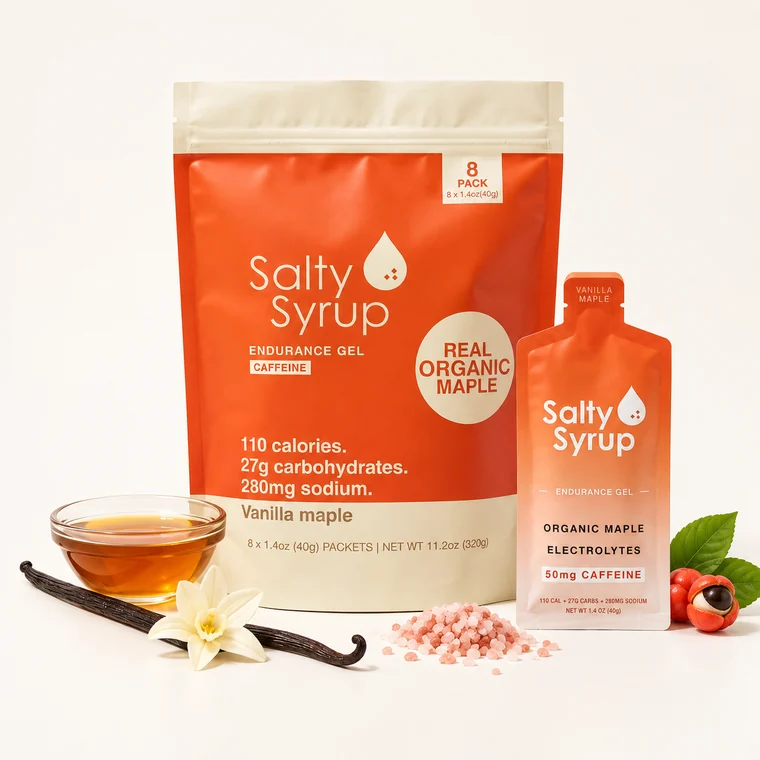
8 pack photo: one bag
keywords: "Vanilla Maple - Caffeinated", "8 pack"
“Vanilla Maple - Caffeinated Salty Syrup endurance gel packs with pink salt and mint leaves, available in 8 pack.”
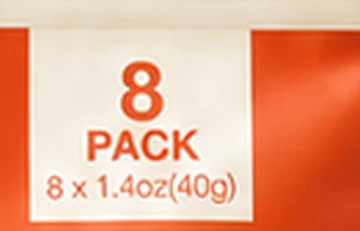
magnified
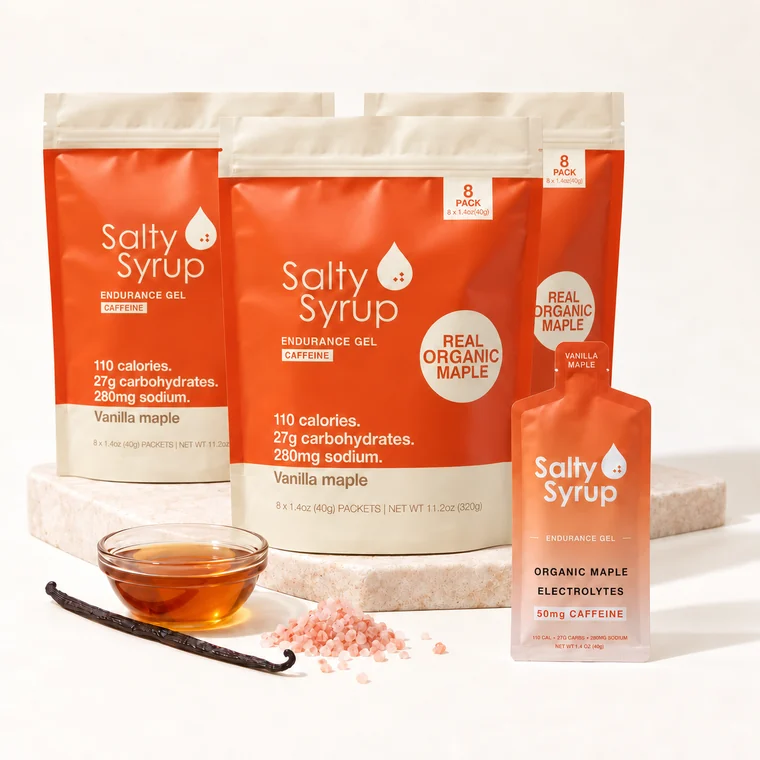
24 pack photo: three bags, every badge reads 8 PACK
keywords: "Vanilla Maple — Caffeinated", "24 pack"
“Salty Syrup Vanilla Maple — Caffeinated endurance gel packets, with vanilla bean and maple syrup, 24 pack.”
Look at the 24 pack photo. Three bags, each stamped with an 8, and no 24 anywhere in the frame. A model reading pixels alone has nothing that says 24. The number lives in the Shopify variant option. Step 3 reads the variants before step 4 describes anything.
Step 5: Generate the description
The variant option carries the number the pixels do not.
"asset_id": "shopify-48278502637767",
"keywords": ["Vanilla Maple - Caffeinated", "8 pack"],
"negative_keywords": ["24 pack", "16 pack"],
"max_chars": 125Vanilla Maple - Caffeinated Salty Syrup endurance gel packs with pink salt and mint leaves, available in 8 pack.That asset_id is the products.json feed id, not the MediaImage id.
Step 6: Write it back
fileUpdate on the MediaImage id. productUpdateMedia is deprecated.
shopify store execute --allow-mutations --query 'mutation {
  fileUpdate(files: [{
    id: "gid://shopify/MediaImage/3923...", alt: "..."
}]) { files { id alt } userErrors { message } } }'A clean write receipt is not evidence the agent can see it.
fileUpdate returns userErrors: [] the moment the write lands. On one of the two writes below, catalog search was still serving the old value at the following sample. The agent checks catalog lookup instead.
The loop, run on a live store
Everything above describes a system. This part measures one.
Salty Syrup is a live store, and every image already had alt text. To show the loop end to end, one field was emptied on purpose and then restored. The sequence below is what the store returned at each point.
One, the field as the merchant wrote it.
lookup 8 pack alt_text = "Salty Syrup Caffeinated 8 pack bag with a pouch, maple syrup, vanilla and pink salt"Two, emptied. Run both mutations against a dev store. --allow-mutations with alt: "" deletes the merchant's text. The only remaining copy is the one you read in state one.
shopify store execute --store your-store.myshopify.com --allow-mutations --query 'mutation {
  fileUpdate(files: [{ id: "gid://shopify/MediaImage/39233716224199", alt: "" }]) {
    files { id alt }
    userErrors { field message }
  }
}'
lookup 8 pack alt_text = ABSENTThe key is gone from that response, exactly as it is for the six blank images above. A parser testing for an empty string has nothing to test.
Three, the generated text written back.
shopify store execute --store your-store.myshopify.com --allow-mutations --query 'mutation {
  fileUpdate(files: [{
    id: "gid://shopify/MediaImage/39233716224199",
    alt: "Vanilla Maple - Caffeinated Salty Syrup endurance gel packs with pink salt and mint leaves, available in 8 pack."
  }]) {
    files { id alt }
    userErrors { field message }
  }
}'
lookup 8 pack alt_text = "Vanilla Maple - Caffeinated Salty Syrup endurance gel packs with pink salt and mint leaves, available in 8 pack."Then the original was written back and read again to confirm:
restored alt = 'Salty Syrup Caffeinated 8 pack bag with a pouch, maple syrup, vanilla and pink salt'
RESTORE OK-
alt_text present
State 1: As the merchant wrote it
shopify store execute (no change)
"media": [{ "type": "image", "url": ".../main-8pack.png", "alt_text": "Salty Syrup Caffeinated 8 pack bag with a pouch, maple syrup, vanilla and pink salt" }] -
alt_text absent
State 2: After emptying the field
fileUpdate alt: ""
"media": [{
  "type": "image",
  "url": ".../main-8pack.png"
}]
The key is gone, not empty.
-
alt_text present
State 3: After the agent wrote it
fileUpdate alt: generate_alt_text(...)
"media": [{
  "type": "image",
  "url": ".../main-8pack.png",
  "alt_text": "Vanilla Maple - Caffeinated Salty Syrup endurance gel packs with pink salt and mint leaves, available in 8 pack."
}]
Three states in order. The merchant's text, the field emptied, the generated description written back.
How long the write takes to reach each call
The write was repeated with polling on a ten second interval so the delay could be timed rather than guessed. Both operations were polled after each mutation until each returned the new string. This is the log:
after_write    t+  5.2s  search  MATCH  Vanilla Maple - Caffeinated Salty Syrup ...
after_write    t+  5.2s  lookup  MATCH  Vanilla Maple - Caffeinated Salty Syrup ...
after_restore  t+  3.5s  search  no     Vanilla Maple - Caffeinated Salty Syrup ...
after_restore  t+  3.5s  lookup  MATCH  Salty Syrup Caffeinated 8 pack bag with ...
after_restore  t+ 17.2s  search  MATCH  Salty Syrup Caffeinated 8 pack bag with ...
after_restore  t+ 17.2s  lookup  MATCH  Salty Syrup Caffeinated 8 pack bag with ...
One detail in reading that log. search was sampled at the product slot, lookup at the variant slot. That is where each call carries the field.
So the two calls can disagree for a window measured in seconds. They diverged once, on the second of the two writes. On the first they matched at the same sample. Treat that as an observation from one store on one night, not a service level. What it justifies is narrow. If your agent writes and then verifies, verify against lookup. Do not treat a fast read-back from search as proof.
Step 7: Verify on the surface the agent reads
Not on the write receipt. On catalog lookup.
catalog lookup, 8 pack variant, three states
- as the merchant wrote it alt_text present
- after emptying the field alt_text absent
- after the agent wrote it alt_text present
RESTORE OK
The objection you should be making
An agent builder can reasonably say image descriptions are a store detail. They belong to the merchant. A discovery surface that withholds the field is one more reason not to care.
The finding at the top is what turns that around. This is not a merchant who skipped the work. All twenty images carry alt text in Shopify. The same file still arrives at your agent described in one slot and blank in another, inside a single response. That is not a content problem you can push back to the store. It is a retrieval problem in your code. It decides whether your agent can describe the photograph, or only the paragraph the merchant wrote about it. The store cannot fix it for you, because on their side it is already fixed.
Reproduce it
Every state above came from one script. Here it is, trimmed to the parts that matter:
# capture.py - every state in this article came from this file.
# It restores the field in a finally block, so a failure mid-run cannot leave it empty.
import json, subprocess

STORE   = "your-store.myshopify.com"
BUSINESS = "your-store.com"
MEDIA_ID = "gid://shopify/MediaImage/3923..."   # the MediaImage id, not a feed id
PRODUCT  = "gid://shopify/Product/8645..."
GENERATED = "...the string generate_alt_text returned..."

def sh(cmd):
    return subprocess.run(cmd, shell=True, capture_output=True, text=True, timeout=180).stdout

def read_alt():
    q = '{ node(id: "%s") { ... on MediaImage { alt } } }' % MEDIA_ID
    return json.loads(sh(f"shopify store execute --store {STORE} --query {json.dumps(q)}")
                      .strip())["node"]["alt"]

def set_alt(v):
    q = ('mutation { fileUpdate(files: [{id: "%s", alt: "%s"}]) '
         '{ files { alt } userErrors { message } } }' % (MEDIA_ID, v.replace('"', '\\"')))
    return sh(f"shopify store execute --store {STORE} --allow-mutations --query {json.dumps(q)}")

def lookup():
    out = sh(f'npx -y @shopify/ucp-cli@0.9.0 catalog lookup --business {BUSINESS} '
             f'--input "{{\\"ids\\":[\\"{PRODUCT}\\"]}}" --format json --filter-output result')
    d = json.loads(out)
    for p in d["result"]["products"]:
        for v in p.get("variants", []):
            for m in v.get("media", []):
                return v["title"], m.get("alt_text", "<ABSENT>")

original = read_alt()
try:
    print("state 1", lookup())
    set_alt("");         print("state 2", lookup())
    set_alt(GENERATED);  print("state 3", lookup())
finally:
    set_alt(original)
    print("restored:", read_alt() == original)
With that, plus the AGENT.md and .mcp.json above, every table here is reproducible. Point it at a dev store made with shopify store create dev. Fill in the three ids from your own catalog.
Frequently asked questions
-
No. Seven fields carry the
Inferredlabel in the Global Catalog reference, meaning Shopify's AI generates them.media[].alt_textis not one of them. -
Because the two catalog operations serialize media in a different way. Measured on 2026-09-21,
catalog searchreturnedalt_textin the product slot. It omitted it in every variant slot, including for the same file.catalog lookupdid the reverse. -
lookup, and exactly the medialookupactually returns. They diverged once in two writes:lookuphad the new value at 3.5 seconds,searchat 17.2. On the other write they matched at the same sample. -
read_products,write_filesforfileUpdate,read_translationsandwrite_translationsfor a second language, andread_localesto check whether the store has one. -
ucp discoverreturns no services and every catalog call after it has nothing to talk to. Run discovery first. -
Two, doing two different jobs. A writer: AltText.ai's MCP server, the npm package
@alttext_ai/alttext-mcp. It generates the description, andfileUpdatewrites it into the Shopify image record. A checker: Shopify's own CLI,@shopify/ucp-cli. It reads the catalog back the way a shopping agent does, so you can see whether the description arrived. The checker matters. Shopify marks seven product fieldsInferredand fills them for agents.media[].alt_textis not one of them. -
The agent in this post does it on a schedule. It queries products changed since the last run. It passes each variant's option values to AltText.ai as keywords. It writes the result back with
fileUpdate. Then it confirms throughcatalog lookupthat the agent-facing payload carries it. If you want a straight bulk fill without building an agent, the Shopify alt text integration guide covers that path. For scale: the Admin API on the store used here returned 59 image files. 48 carried an empty alt. That is the kind of gap a scheduled pass closes.
Run this pass on your own catalog
A new AltText.ai account starts with 25 credits, enough to describe a variant pair and check it through catalog lookup before anything is scheduled. The one-prompt MCP install is on the agent setup page.