How to Add Alt Text to Instagram Posts (and What to Do About Reels)
Instagram documents an alt text box for photos and none for Reels. Every tap for new and old posts, what to write in 100 characters, and what to do for video.
Instagram documents an alt text box for photos and none for Reels, and the box holds about 100 characters. So on Instagram, alt text is one specific line you write before you tap Share, and a Reel needs a caption plan instead.
What does alt text mean on Instagram?
Alt text is a short written description of your photo that a screen reader reads aloud to someone who can't see it. Instagram's own setting puts it this way: "Alt text describes your photos for people with visual impairments." It is not a caption and it never shows on your post. Edit alt text, the button you see in edit mode, is where you change that line.
How do I add alt text to a new Instagram post?
Pick your photo, finish editing and tap Next. On the caption screen, scroll to the bottom and tap More options (some versions say Advanced Settings), then Write Alt Text under Accessibility. Type your line and tap Done, then Share. On a computer, Accessibility is a section of the last screen before you share. The steps come from Instagram's help page and Utah State University's Instagram guide.
-
Tap 1: Next, after you pick the photo and finish editing it.
-
Tap 2: More options, at the bottom of the caption screen. Some versions call it Advanced Settings.
-
Tap 3: Write alt text, under Accessibility.
-
Tap 4: Done, then Share, your line replaces Instagram's automatic description.
Instagram Help Center, Edit the alternative text for a post on Instagram; Utah State University, Instagram Accessibility (screens redrawn from its 2026 screenshots).
How do I add or change alt text on a post I already shared?
Open the post and tap the three dots above it (Options), then Edit. Tap Edit alt text at the bottom right of the photo, write your line and tap Done. On a computer the same path ends at Accessibility.
-
Tap 1: The three dots, above the photo, on the post itself.
-
Tap 2: Edit, in the menu that slides up.
-
Tap 3: Edit alt text, bottom right of the photo. In a carousel, each photo has its own.
-
Tap 4: Done, after you type the new line. Same 100-character limit as a new post.
Instagram Help Center, Edit the alternative text for a post on Instagram; Hootsuite on carousel posts (screens redrawn from its screenshots).
A carousel gives every photo its own slot in edit mode, as Hootsuite's walkthrough shows, so a ten-image post needs ten lines.
Can you add alt text to Instagram Reels and Stories?
Not through an alt text box. Instagram's help page documents alt text for photos and says nothing about Reels or Stories. The guides from Utah State University and the University of South Carolina send video through captions instead. A Reel gets the Closed Captions button. A Story gets the Captions sticker.
- Photo post Alt text box
- Carousel photo Alt text box
- Reel No alt text box, use captions
- Story No alt text box, use captions
Instagram Help Center; Utah State University and University of South Carolina accessibility guides. Reels use the Closed Captions button, Stories the Captions sticker.
Turn captions on and read them before you post. Auto-generated captions can be wrong. Then describe the picture in your post caption. The Perkins School for the Blind points longer image descriptions to the caption or comment section. For a Reel, that is where the description lives: Image description: oat milk pours into an iced espresso and the glass turns from black to tan.
Can people see alt text on Instagram?
No. Instagram reads alt text only to people using a screen reader. It never appears on the post.
To check what your own post says, open it in edit mode again. If you never write a line, Instagram supplies one: it generates an automatic description with object recognition, and its help page says you can replace it with a better one.
How long should Instagram alt text be?
Keep it to one sentence under 100 characters. That is the limit the Perkins School for the Blind and NISM both give for Instagram. Perkins suggests about 140 characters for social alt text in general and moves longer descriptions into the caption.
Spend those characters on the point of the post. Compare woman holding coffee with Our new oat latte in a clear glass cup, foam art shaped like a leaf. The first lists objects. The second tells a screen reader user why the photo is on your feed. If the image carries words, like a sale price or an event date, put them in the alt text. Don't count on the automatic description to catch them.
Is there a free Instagram alt text generator?
Free for your first 25 images. Every new AltText.ai account starts with 25 credits and no credit card, and one credit describes one image.
Start in your account settings. Turn on Enforce a Maximum Length and set it to 100 characters. The setting applies to alt text you generate on the website, in integrations and through the API. That keeps the drafts inside Instagram's box. Pick the Concise or Terse writing style while you are there. Then upload the photo, or paste its URL, in the AltText.ai web app and paste the line into Instagram's Accessibility screen.
On a computer, the browser extension for Chrome and Firefox is faster for an image already on a web page. Right-click the image and choose AltText.ai: Get alt text. The extension can copy the line to your clipboard for you.
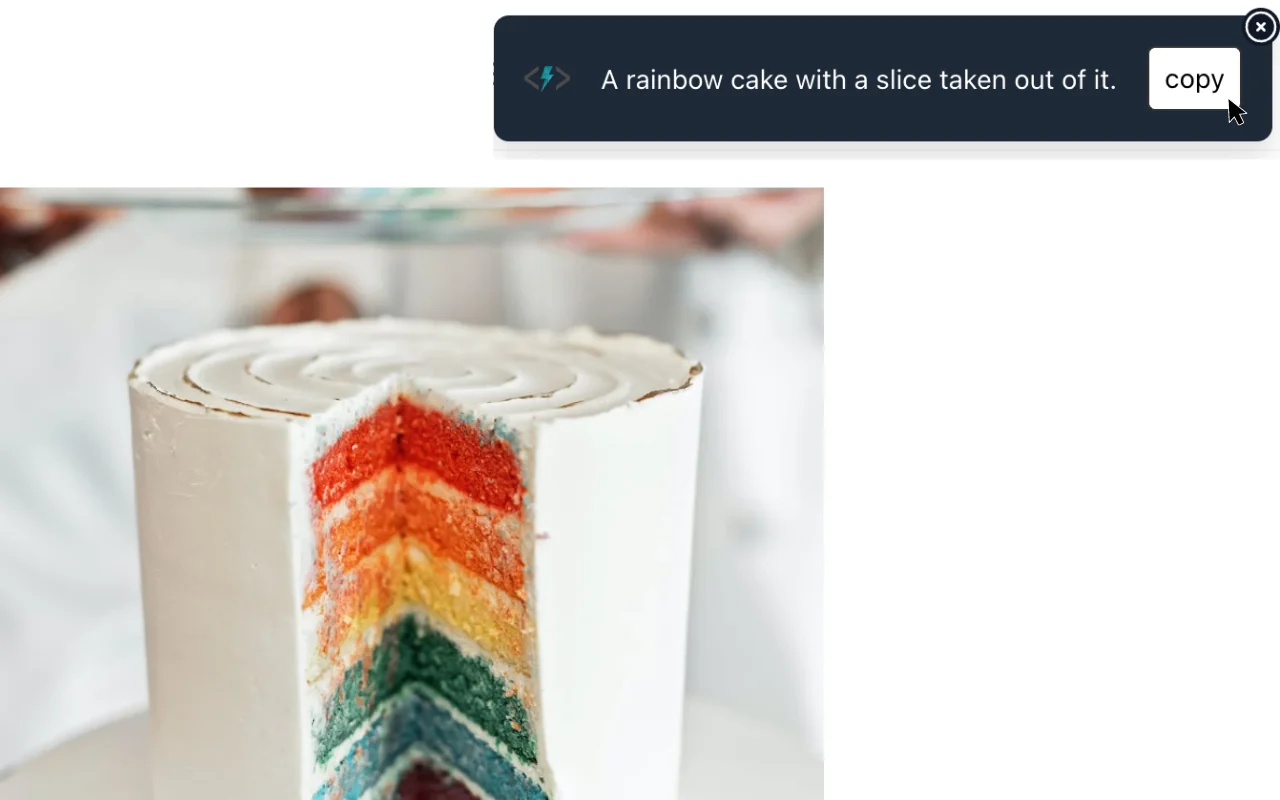
The line it returned, 44 of 100 characters
A rainbow cake with a slice taken out of it.
Copy it, paste it into Instagram's Accessibility screen, then add the detail your post is about.
AltText.ai documentation, Browser Extension.
AltText.ai writes in 130+ languages if your followers read something other than English. Each additional language costs 1 extra credit per image. Keep a few of the 25 credits back to rerun a draft that missed the detail your post is about.
Frequently asked questions
-
No. Instagram's alt text box is for photos. For a Reel, turn on captions and describe the picture in your post caption.
-
No. Only screen readers read it out. It never appears on the post.
-
Yes. Open the post, tap the three dots, then Edit, then Edit alt text at the bottom right of the photo.
-
One sentence under 100 characters, the limit the Perkins School for the Blind gives for Instagram.
-
AltText.ai describes your first 25 images free, with no credit card.
AltText.ai in your assistant
Your AI agent can write your Instagram alt text.
Add AltText.ai to Claude, ChatGPT or Muse with one URL and a sign-in. Then ask it to describe your next Instagram photo, and paste the line into Instagram.


Words that describe
“Our new oat latte in a clear glass cup, foam art shaped like a leaf.”
Ready to paste into Instagram